

To troubleshoot ecommerce checkout failures, trace an affected attempt from the browser through payment authorization, order creation, and confirmation, then repair the first point where the records diverge. Before asking the customer to retry, establish whether the original payment succeeded; a checkout error does not prove that no money moved.
- To troubleshoot ecommerce checkout failures, reconcile payment status and order records before encouraging another attempt.
- Thefiniteloop’s position: isolate the failing checkout boundary before approving a rebuild.
- A browser error, payment decline, and missing order require different investigations.
- Verify the repair through payment reconciliation, order creation, and customer confirmation—not the success screen alone.
How do you investigate checkout failures in an online store?
Start with a specific failed checkout, not a general report that conversion has dropped. Your investigation needs a timestamp with timezone, the checkout stage, a safe reference identifier, and the observed outcome. Compare that attempt with a successful attempt under comparable conditions.
For your 2026 incident checklist, use this sequence:
- Confirm payment status. Find the provider's authoritative record before recommending another attempt.
- Locate the failure boundary. Establish whether checkout stopped before payment, during authentication, or after payment.
- Match the records. Connect the browser request, server request, payment reference, and order reference where available.
- Reproduce the conditions. Match the payment method, browser, cart, locale, and customer state.
- Repair and verify. Test the original failure and adjacent paths, then reconcile affected transactions.
Use the payment integration testing guide to turn the incident into repeatable acceptance checks. Do not close the investigation because the checkout button works again.
Why this matters
Checkout recovery is a transaction-integrity problem before it is a design problem. A customer-facing error and a payment-provider success record can exist for the same attempt. Your support response must account for both.
Thefiniteloop provides ecommerce development for founders and businesses that need engineering support. Our position for a 2026 checkout investigation is straightforward: establish what happened before changing the architecture. A rebuild is not a substitute for a transaction trace.
Set an incident owner who can coordinate storefront, backend, payment, and support work. Shared access does not create shared accountability; someone must decide which evidence proves recovery.
Classify the failure before changing anything
The customer's wording is useful evidence, but it is not a technical diagnosis. “Payment failed” can describe a rejected card, a blocked browser request, an incomplete authentication step, or an order confirmation that never appeared.
Use this comparison to choose the first investigation path. These are diagnostic routes, not competing fixes.
| Observed outcome | Best for investigating | First evidence to inspect | What that evidence cannot prove |
|---|---|---|---|
| Checkout never submits | Browser-side failure | Console errors and network requests | Whether another attempt reached the server |
| Shipping or totals fail | Checkout calculation failure | Calculation requests and server responses | Whether the payment integration works |
| Payment is declined | Provider or issuer rejection | Provider status and documented response code | That the storefront integration is defective |
| Authentication does not finish | Redirect or authentication failure | Authentication result and return request | That payment failed without checking its status |
| Payment succeeds, order is absent | Transaction consistency failure | Payment record, order logs, event processing | That the customer should pay again |
| Order exists, confirmation is absent | Confirmation-path failure | Order state, confirmation request, message logs | That order creation failed |
Record the exact state rather than translating everything into success or failure. Authorization, capture, cancellation, and refund are distinct payment states; interpret them using your provider's documentation.
What if payment succeeded but no order exists?
A successful payment with no matching order requires reconciliation before another charge. Locate the provider reference, confirm the relevant payment state, and check whether order creation failed or remains pending.
Investigate the order write, event handler, and retry history. Recovery must preserve the relationship between the original payment and the resulting order. Creating an unrelated replacement order can leave your operational records inconsistent.
What if the order exists but the customer saw an error?
An existing order shifts the investigation toward the response, redirect, or confirmation path. Check whether the browser lost its session, received an error response, or returned to the wrong route after authentication.
Verify the order's payment state separately. An order record alone does not establish that payment was collected, and a confirmation email is not the payment ledger.
Build a safe evidence packet
Give developers evidence that identifies the attempt without exposing the customer's payment credentials. A screenshot helps explain what the customer saw; correlated system records explain what happened.
Capture the following in your incident record:
- Attempt context: Timestamp with timezone, device, browser, checkout stage, and storefront language.
- Safe references: Checkout identifier, order identifier if present, payment-provider reference, and request identifier.
- Cart conditions: Products, shipping destination, delivery method, discount state, and displayed currency.
- Observed behavior: Exact error text, the action immediately before it, and whether the customer retried.
- System evidence: Sanitized request failures, server exceptions, provider status, and relevant deployment changes.
Do not collect full card numbers, card security codes, passwords, session tokens, or secret keys. Sanitize network exports before sharing them; browser request files can contain credentials and personal information.
Keep evidence access limited to the people investigating the incident. Define retention and handling requirements for the jurisdictions involved rather than treating every market's obligations as interchangeable.
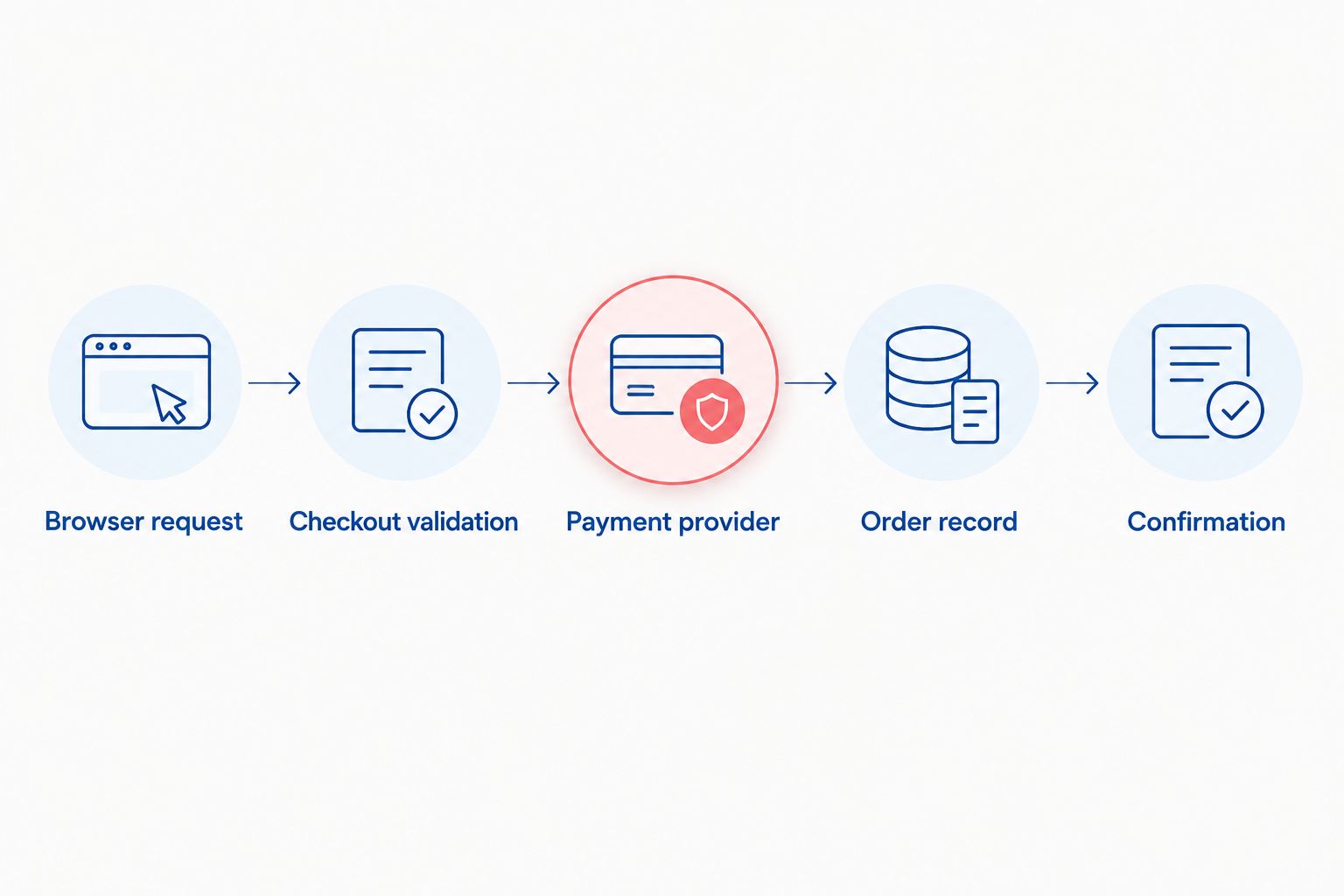
Trace the checkout across its boundaries
Follow the transaction in execution order. In your 2026 runbook, make each boundary observable so that the next incident does not depend on reconstructing events from screenshots.
Browser request
Check whether the browser sent the expected request. Inspect script errors, failed requests, validation messages, and the response body rather than relying on the visible notification alone.
HTTP 400 responses indicate a client-error response; HTTP 500 responses indicate a server-error response. Neither code identifies the root cause by itself. Read the associated application error and request context.
Checkout validation
Check the server's interpretation of the cart, customer, address, shipping method, discount, tax calculation, and currency. Confirm that the server accepted the same state the browser displayed.
Compare a failed cart with a successful cart that differs in a relevant condition. Changing several inputs at once makes reproduction less useful because you cannot tell which change removed the failure.
Payment provider
Find the provider's record using the payment reference. Read its documented status and error details, then distinguish an issuer decline from a malformed request, an authentication interruption, or a transport failure.
Treat a timeout as an unknown outcome until you query the provider. A response that never reached your server does not prove the provider rejected the operation.
Order record
Check whether the application created, updated, or rejected the order. Inspect validation errors, database failures, stock decisions, and application exceptions around that attempt.
Determine which event is supposed to advance the order state. A browser redirect and a provider webhook can arrive independently; your integration needs an explicit rule for handling them.
Confirmation
Verify the customer-facing result after establishing payment and order state. Inspect the confirmation route, session handling, email dispatch, and account order history where those features exist.
Confirmation is the final boundary, not proof that every earlier boundary behaved correctly. Keep the underlying transaction references available for reconciliation.
Why checkout failures vary
Choose investigation conditions from the affected attempts, not assumptions about your typical customer. These factors change the path that checkout executes:
- Payment method: Card entry, wallet handoffs, and redirected methods use different interaction paths.
- Authentication: A challenge introduces a return journey that must preserve the checkout context.
- Browser and device: Storage behavior, extensions, and browser-specific errors can change the observed result.
- Cart and destination: Shipping eligibility, stock, address validation, and calculations depend on the submitted details.
- Language and currency: Localized inputs and currency handling need explicit validation rather than visual inspection alone.
- Recent changes: Application releases, configuration edits, and integration updates are concrete comparison points in the incident timeline.
None of these factors proves causation. Use them to select test cases, then require a reproducible failure or correlated logs before assigning the cause.
Repair the failed boundary, not the whole store
Prefer a bounded repair when the evidence identifies a bounded defect. A broken return route does not justify replacing the commerce platform. A wider redesign needs evidence that the existing architecture cannot support the required behavior.
For a 2026 remediation decision, write the defect and acceptance condition together. For example: the authentication return loses the checkout reference; the repaired path must retain that reference and resolve the existing transaction without creating another payment.
Check retry safety explicitly. Idempotency means that repeating the same operation does not create an additional business effect, such as another charge or order. Use the mechanisms your payment provider and application support; do not assume a disabled button protects server-side processing.
Webhook handlers also need duplicate-event handling and safe state transitions. Verify authenticity using the provider's documented method, record processing outcomes, and preserve enough context to investigate failures without storing sensitive payloads unnecessarily.
Prove recovery before closing the incident
Your 2026 acceptance record should show more than a successful demonstration. Re-run the original failing conditions and verify the resulting payment, order, and confirmation records against one another.
Include checks for:
- A successful checkout on the repaired path.
- A declined payment with a clear, accurate customer message.
- An interrupted authentication journey with a recoverable outcome.
- A repeated submission without an unintended duplicate transaction.
- A delayed or repeated provider event without an incorrect order transition.
- An affected historical attempt reconciled to its actual payment state.
Use a test environment and documented test methods where available. Production verification needs controlled access, clear ownership, and a reconciliation plan—not uncontrolled repeated purchases.
Separate technical recovery from backlog cleanup. The repaired checkout can work while earlier attempts still need order correction, customer communication, or financial reconciliation.
Scope the checkout repair
Define the failing boundary, required evidence, and acceptance checks before changing the store.
FAQ
How do I troubleshoot ecommerce checkout failures?
Trace a failed attempt through the browser, checkout server, payment provider, order record, and confirmation path. Establish the payment outcome first, then repair the earliest boundary where the evidence diverges.
Why does my checkout fail only on mobile?
A mobile-only checkout failure requires comparison of browser requests, validation, and payment handoffs under the affected device conditions. Reproduce the reported browser and payment method rather than assuming the page layout is responsible.
Should customers retry when checkout shows an error?
Customers should not retry an uncertain payment until its original status is checked. A timeout or failed confirmation page does not establish that the provider rejected the payment.
Why was a customer charged without receiving an order confirmation?
A charge without confirmation requires separate checks of payment state, order creation, and confirmation delivery. The payment can succeed while a later application step fails.
Should I rebuild my store to fix checkout errors?
Rebuild only when the investigation demonstrates that the existing architecture cannot support the required transaction behavior. An isolated integration or validation defect calls for a targeted repair and regression testing.
What should I send a developer about a failed checkout?
Send a timestamp with timezone, safe transaction references, checkout conditions, exact error text, and sanitized technical logs. Exclude payment credentials, secret keys, session tokens, and unnecessary personal information.
How do I know a checkout fix is complete?
A checkout fix is complete when the original failure passes, adjacent failure paths behave correctly, and affected payments reconcile with orders. A working success page alone is insufficient evidence.
One last thing
Thefiniteloop is best suited to founders and SMEs seeking ecommerce development, not a replacement payment provider. Keep that boundary clear when assigning the incident: your engineering team investigates the integration, while provider records establish the provider's transaction state.
The most useful closing question is not whether checkout works now. Ask whether every affected payment has an explainable outcome and a responsible owner. That is what makes the incident ready to close.
Related guides
- Recover safely from failed integration syncs
- Accept a software delivery before final payment
- Test an Arabic-English ecommerce store before launch
Your project next
Let’s build what matters
Schedule a consultation to discuss your goals and technical needs.
3 thoughts on “How to investigate checkout failures in an online store”