

Yes—a PWA can replace a native ecommerce app when your essential journeys are product discovery, account access, cart management and checkout, and those journeys work across your customers’ browsers. Keep native when a verified requirement depends on device capabilities, background behavior or app-store distribution that your web implementation cannot adequately deliver.
- Can a PWA replace a native app for ecommerce? Yes, when browser-based shopping meets your actual requirements.
- Finite Loop’s recommendation: prove checkout and integration compatibility before committing to a PWA replacement.
- A native ecommerce app earns its place through necessary capabilities, not an app-shaped interface.
- Keep your existing storefront if its problems can be fixed without rebuilding the delivery channel.
Can a PWA replace a native mobile app for ecommerce?
A PWA is a valid replacement for a native ecommerce app, not an automatic upgrade. Decide against documented customer journeys, browser support and operational requirements—not a feature checklist detached from your store.
For a 2026 buying decision, make the replacement pass a written acceptance plan. Use the same discipline described in how to accept a software delivery before the final payment: define the evidence that proves the software works before treating delivery as complete.
| Approach | Best for | Main advantage | Main limitation |
|---|---|---|---|
| PWA | Web-led stores whose required journeys work in supported browsers | Supports browser shopping and an installed experience from a web application | Installation, notifications and device capabilities depend on the platform |
| Native app | Stores with validated requirements that need native capabilities or app-store distribution | Direct access to platform-specific application frameworks | Adds an application release and maintenance responsibility alongside your website |
| Improve the current storefront | Stores whose problems are checkout, content or integration defects | Addresses the problem without replacing the delivery channel | Does not solve a genuine need for native capabilities |
These are architectural choices, not rankings of engineering quality. A poorly implemented native app can fail checkout; a poorly implemented PWA can do the same. Neither label proves speed, reliability or commercial value.
Why this matters
Replacing an app changes more than its interface. Your team must account for sign-in, saved carts, payment redirects, customer communications, analytics and support instructions.
A rebuild also creates migration work. Existing customers need a clear route to the replacement, while your operations team needs confidence that orders still reach the systems responsible for fulfillment.
Do not approve a replacement merely because the current app is difficult to maintain. First identify whether the difficulty comes from the client application, shared services, integrations or unclear ownership. Replacing the wrong layer preserves the original problem.
When a PWA is the right replacement
A PWA fits when your ecommerce business is fundamentally web-led and the required shopping experience works within browser capabilities. Customers can enter through product links, browse your catalog and complete checkout without first installing an application.
Installation can support returning customers, but it should not become a condition for buying. Design the browser journey as a complete experience rather than a restricted preview of the installed version.
The strongest replacement case starts with a narrow scope: preserve the journeys customers need, remove unnecessary app-specific complexity and prove the difficult integrations early. Do not recreate every screen simply because it exists today.
For your 2026 scope, separate essential requirements from preferences. An installation icon is a preference unless your business can explain the workflow it supports. A payment method your customers depend on is a requirement.
Best for: ecommerce teams whose complete shopping journey works on the web. The trade-off is accepting browser and operating-system boundaries rather than promising identical behavior everywhere.
When the native app should stay
Keep native when an essential, tested requirement cannot be delivered adequately through your supported browsers. Examples include specialized device integrations or background work whose required behavior exceeds what the web platform permits.
Do not assume that using a camera, sending a notification or showing a location automatically requires native development. Web support exists for many capabilities, but support and permissions differ. Test the exact task on the devices you intend to support.
App-store distribution can also be a genuine business requirement. If it is, assess it separately from the shopping interface. An installable website and an app-store listing are not the same distribution route.
Native development still leaves work outside the app. Product data, payment processing, inventory and order handling need reliable services regardless of the client interface.
Best for: ecommerce teams with proven platform-specific requirements. The trade-off is maintaining the application release process and its supported versions, not simply building an additional screen layout.
When improving the current storefront is enough
A PWA replacement is unnecessary when the underlying problem is a broken payment redirect, slow product imagery or an unreliable inventory integration. Diagnose the defect first.
A responsive website can provide a complete mobile shopping journey without becoming an installed application. If your customers do not need installation, offline behavior or other app-like capabilities, adding those features expands scope without resolving a stated requirement.
Keep this option in the decision even when a rebuild sounds attractive. Ask the delivery team to explain which requirement the existing architecture cannot meet and what evidence supports that conclusion.
Best for: stores with fixable defects rather than a missing delivery capability. The limitation is straightforward: targeted repairs cannot create capabilities the architecture genuinely lacks.
Why the replacement decision varies
The right choice depends on the work your customers and operations team need to complete. These factors belong in the scope before a technology recommendation:
- Browser support: Define supported browser and operating-system combinations. Test the actual features, not just whether the homepage renders.
- Checkout dependencies: Confirm payment-provider redirects, authentication challenges and return journeys. A checkout that works in one context is not proof for every context.
- Device requirements: Specify the exact camera, location, scanning or background task. Distinguish required behavior from a broad request for device access.
- Offline expectations: Separate reading cached content from committing a transaction. An offline cart is not a confirmed order.
- Distribution requirements: Decide whether browser access, home-screen installation or app-store presence is essential to the business.
- Operational ownership: Assign responsibility for releases, security updates, monitoring, cache behavior and integration failures.
A decision record should state which requirement determines the architecture. If none does, choose the least complex approach that passes the acceptance tests.
How do you prove a PWA can replace your ecommerce app?
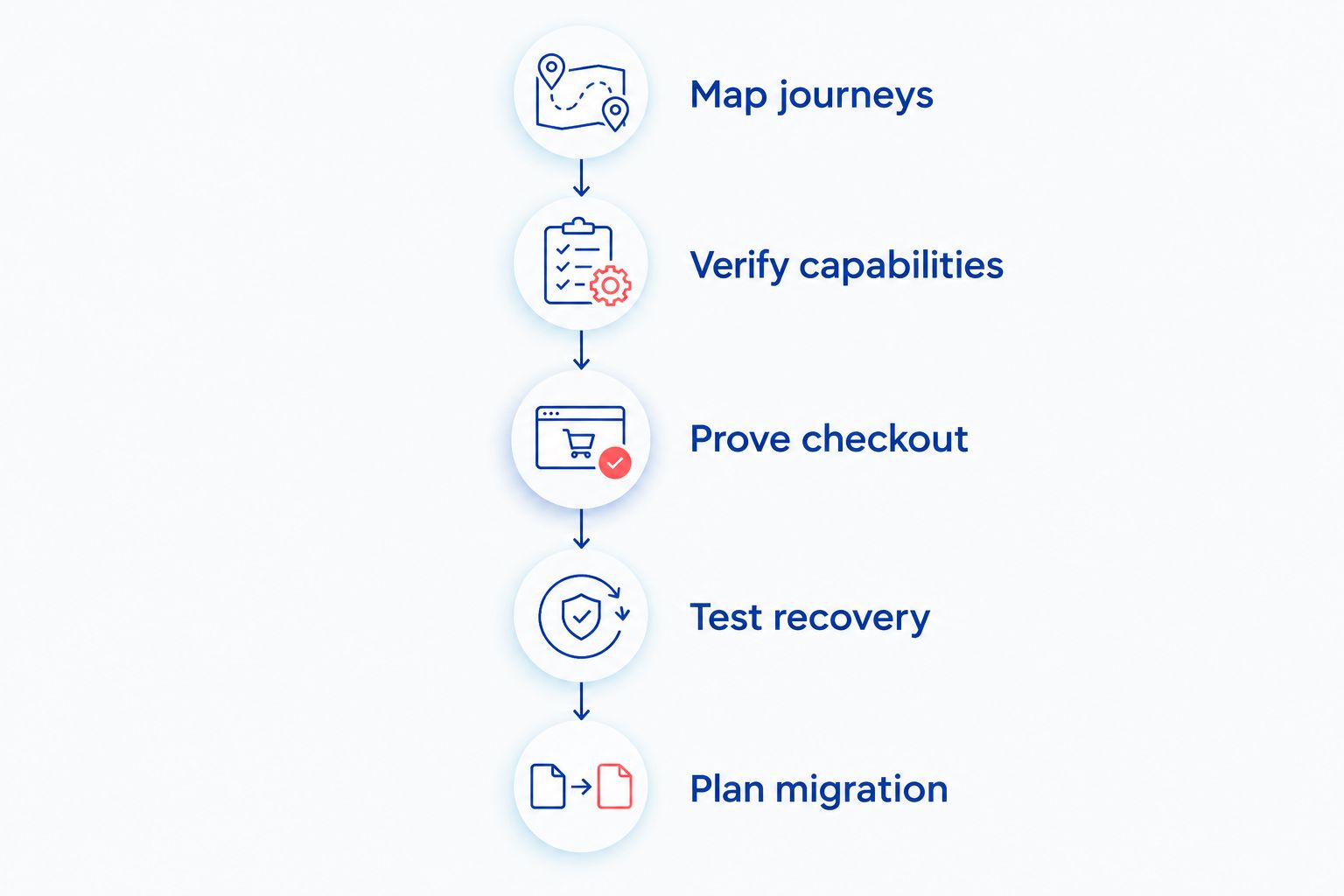
Use a working slice of the hardest customer journey before approving the full replacement. A prototype that only displays product cards does not resolve payment, session or order-handling risk.
- Map journeys. Document discovery, sign-in, cart changes, checkout, payment return and order confirmation. Include failed and interrupted paths, not only successful purchases.
- Verify capabilities. Test necessary browser features on your supported devices. Check both browser use and installed use where installation is part of the scope.
- Prove checkout. Run provider-supported test transactions through authentication, cancellation, delayed responses and recovery. Confirm that the order system and customer-facing result agree.
- Test recovery. Interrupt connectivity and close the application during critical steps. Verify that retries do not create duplicate orders or leave misleading success messages.
- Plan migration. Define customer communication, session handling, monitoring, rollback and retirement of the old app. Keep responsibility explicit throughout the transition.
Make payment acceptance its own workstream. The guide to testing payments before an online store launch provides a related planning reference; select payment providers and methods for your actual markets rather than assuming regional availability is universal.
Your proof should produce observable results: the payment state, order state, customer message and recovery action. Screenshots alone cannot establish whether the underlying transaction completed correctly.
What performance evidence should you require?
For a 2026 acceptance plan, use Google’s published Core Web Vitals thresholds as baseline web-experience checks. A good Largest Contentful Paint is 2.5 seconds or less, a good Interaction to Next Paint is 200 milliseconds or less, and a good Cumulative Layout Shift is 0.1 or less.
Assess those thresholds at the 75th percentile of page visits, with mobile and desktop considered separately. These measures describe loading, responsiveness and visual stability; they do not prove checkout correctness or business performance.
Test representative product, category and checkout pages. Include realistic product imagery, third-party scripts and account states rather than an empty demonstration storefront.
Do not accept “PWA” as a performance guarantee. Require measured behavior and investigate regressions after release. A service worker—the browser component that can intercept requests and manage cached resources—also needs an update strategy so customers do not remain on incompatible application versions.
Can a PWA support offline ecommerce shopping?
A PWA can support cached product browsing and locally retained cart information when those behaviors are deliberately implemented. It cannot confirm current inventory or complete a server-dependent transaction without reaching the required services.
Show the difference clearly. Label pending actions, refresh stock before order submission and explain what happens when connectivity returns.
Avoid storing sensitive payment information in general-purpose browser caches. Offline convenience must not blur the boundary between a saved intention to buy and an accepted order.
Can a PWA send ecommerce push notifications?
A PWA can send web push notifications on supporting platforms after the necessary permission and installation conditions are met. Support is not identical across browsers, operating systems and usage contexts.
For a 2026 rollout, validate notification enrollment and delivery on your supported device matrix. Keep order confirmation accessible through the account journey and other agreed communication channels; a push notification must not be the only evidence that an order exists.
Should you retire the native app immediately?
Retire the native app only after the replacement passes acceptance and customers have a workable transition path. Publishing the PWA does not resolve existing sessions, customer expectations or unsupported workflows.
Avoid an indefinite overlap without ownership. Define who watches failures, who can pause the transition and what evidence permits retirement of the old application.
Finite Loop’s position on ecommerce development is simple: a replacement should remove a proven constraint, not create a new interface around the same unresolved systems. Its custom web and mobile development services are relevant to either route; browser limitations and native maintenance obligations still require explicit decisions.
FAQ
Can a PWA fully replace my native ecommerce app?
A PWA can replace your native ecommerce app when every essential customer journey and operational dependency works in your supported browser environments. Keep native if a required capability fails that test.
Do customers have to install a PWA before buying?
No, customers can shop through a PWA in their browser without installing it. Your browser checkout should remain complete even when home-screen installation is offered.
Will a PWA automatically make my store faster?
No, a PWA does not automatically make your store faster. Performance depends on implementation, content, scripts, caching and the services behind the storefront.
Is a PWA better than a native app for search visibility?
A PWA can expose crawlable web pages for search discovery, but the PWA label does not guarantee indexing or rankings. Product URLs, rendered content, internal links and crawl controls still need correct implementation.
Can customers pay while a PWA is offline?
A PWA cannot complete a payment that requires an unavailable payment service. It can retain permitted local shopping information and resume the online journey when connectivity returns.
Can a PWA use the same ecommerce backend as my app?
A PWA can use the same backend when its interfaces support the required authentication, catalog, cart, payment and order operations. Existing backend availability does not prove that every client integration will work unchanged.
What should I ask a development company before replacing my app?
Ask which verified requirement determines the architecture and how the team will prove it works. Require a supported-device matrix, checkout acceptance tests, migration ownership and a rollback plan.
One last thing
An offline success screen is not proof of an accepted order. Before signing off your 2026 replacement, disconnect the device during checkout and inspect what the customer sees alongside the authoritative order record.
Finite Loop is a fit for ecommerce teams seeking custom web and mobile development. Choose the implementation only after the acceptance evidence supports it—and keep the existing storefront when a focused repair solves the problem.
Related guides
- Investigating checkout failures in an online store
- Who should own ecommerce maintenance after launch?
- Who owns the code when you hire a software company?
Your project next
Let’s build what matters
Schedule a consultation to discuss your goals and technical needs.