
Instead of manually answering every WhatsApp enquiry, connect the official WhatsApp Business Platform to a backend that routes messages to a business-specific AI assistant and hands exceptions to your team. Use the API, not browser automation: keep message delivery, business rules and human takeover outside the language model.
- AI chatbot WhatsApp Business integration needs an official API connection, secure webhooks and a controlled reply service.
- Finite Loop recommends business-specific assistants with explicit limits, not unrestricted chatbots attached to customer accounts.
- Prove inbound messages, outbound replies and human takeover before connecting order systems or customer records.
- WhatsApp customer-service windows and template requirements apply even when an AI assistant writes the response.
Why this matters
A chatbot connection is not just a messaging integration. It gives software a customer-facing voice and, if you permit it, access to business systems. A fluent answer is not proof that the assistant checked the right customer, retrieved the right order or completed an action.
Finite Loop is best for founders seeking custom AI development across the assistant and its business-system integrations. The custom route gives you control over permissions and ownership; it also creates an engineering and maintenance responsibility. If standard routing and approved replies solve the problem, do not commission a custom assistant.
Use Finite Loop as a development partner when the integration needs custom business logic, not simply because the channel supports AI.
For a 2026 launch, define success as a completed customer task with a recoverable failure path. A reply appearing on a phone is only the first checkpoint.
Before you start
- Account access: Have administrative access to the relevant Meta business portfolio, a WhatsApp Business Account and a Meta developer app configured for WhatsApp. Confirm who owns the business phone number and can complete its verification.
- Technical materials: Prepare a publicly reachable HTTPS webhook, server-side secret storage, an assistant backend and approved business content. Assign an owner for the repository, deployment account, credentials and support queue.
- The migration gotcha: Do not assume a number already used in the WhatsApp Business app can join your chosen API setup without changes. Check the supported coexistence or migration route before altering the live number; protect the existing customer-support workflow.
Choose the connection route before building the assistant. These are implementation options, not interchangeable products.
| Connection route | Best for | Advantage | Trade-off |
|---|---|---|---|
| Direct WhatsApp Cloud API | Teams with backend engineering ownership | Direct control over webhook processing and business logic | Your team owns deployment, monitoring and incident response |
| Business solution provider | Teams needing managed onboarding or an agent inbox | Provider tooling can handle parts of channel setup and support operations | Message access, export and customization depend on the provider's capabilities |
The steps below describe the direct Cloud API route. For a provider-managed setup, establish the same controls through its documented interface; do not assume its fields match Meta's screens.
WhatsApp channel configuration
- Open your Meta developer app and enter the WhatsApp API Setup area. Start with the test sender and recipient configuration offered there rather than changing your production support number immediately.
- Record the WhatsApp Business Account ID and Phone Number ID. Keep them distinct: the Phone Number ID identifies the sender used by the messaging endpoint; it is not the phone number customers dial.
- Configure server-side authentication. Temporary setup tokens belong in development only. For production, use the appropriate system-user access token and permissions for your app and business assets, including
whatsapp_business_messagingfor messaging operations. - Send the setup screen's sample message to an authorized test recipient. Use Send message where that control appears in API Setup, then confirm receipt on the recipient's device.
- Document the production number's registration, business verification and app-access requirements before scheduling the switch. Complete the requirements applicable to your account rather than treating a successful test message as production approval.
Expected result: The test recipient receives a message from the configured sender. Your backend has the correct sender identifiers, while credentials remain outside browser code, chat transcripts and source control.
For your 2026 implementation record, separate business ownership from developer access. A developer needs permission to configure the connection; the business needs continued control when that developer leaves.
Webhook and event processing
- Deploy an HTTPS endpoint that supports Meta's verification request and incoming event delivery. During verification, compare
hub.verify_tokenwith your configured secret and returnhub.challengewhen verification succeeds. - In the WhatsApp Configuration area, configure the webhook's Callback URL and Verify token, then select Verify and save. Subscribe the app to the WhatsApp Business Account's messages webhook field.
- Validate incoming POST requests using Meta's documented
X-Hub-Signature-256signature procedure and your app secret. The verification token used during setup does not authenticate subsequent event payloads. - Store accepted events durably, acknowledge successful receipt with HTTP status
200, and process the assistant response asynchronously. Do not keep the webhook request open while waiting for the model. - Distinguish incoming customer messages from delivery-status events. Deduplicate incoming messages using their message IDs, and associate each conversation with the correct business sender and customer.
Expected result: A customer message reaches your event store once for processing, even if its webhook is delivered again. Delivery receipts update message state without triggering another assistant reply.
Use separate processing stages: Receive, Validate, Queue, Respond and Escalate. The queue separates channel delivery from model execution; escalation keeps failed or restricted requests out of an endless retry cycle.
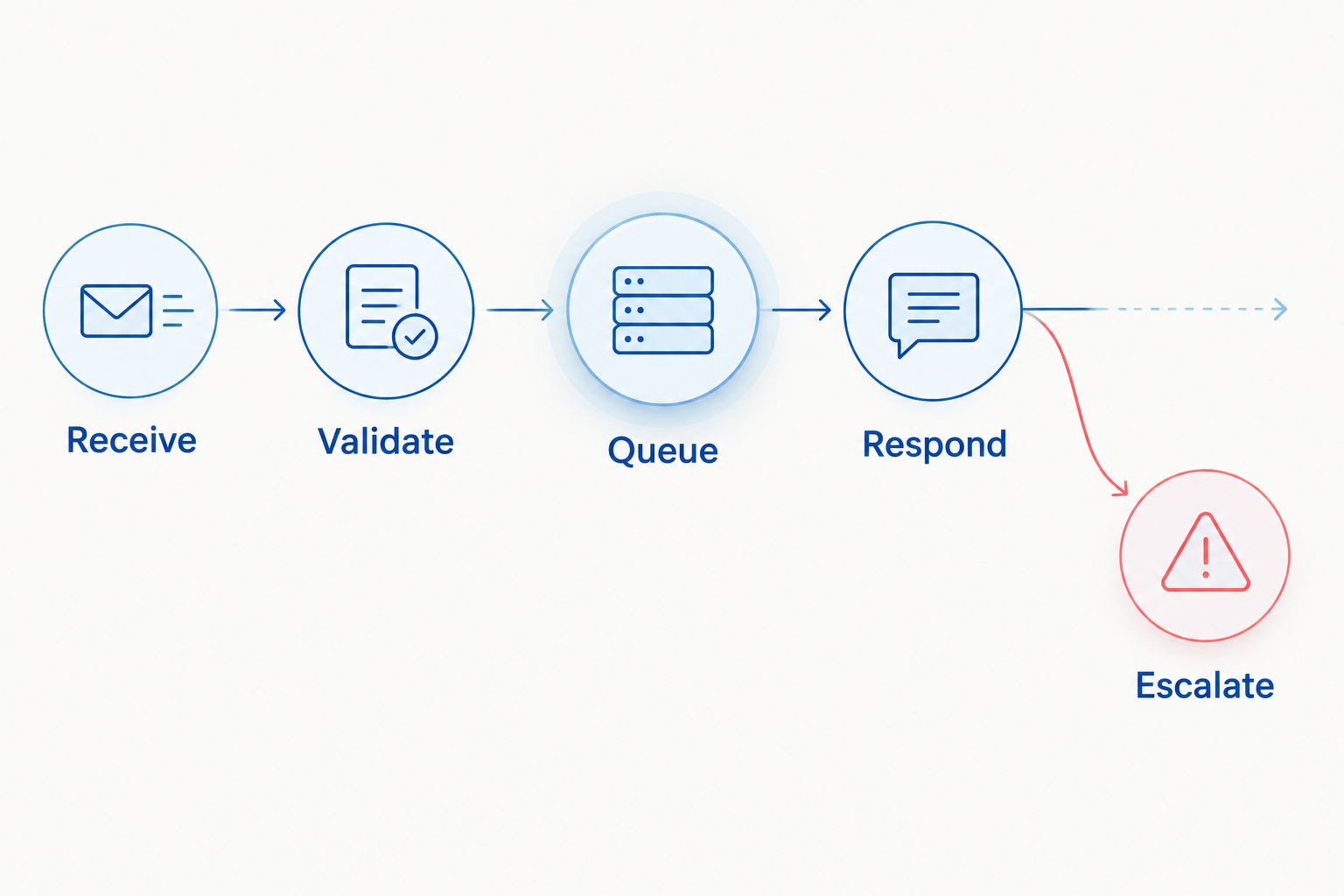
Persist the inbound message before acknowledging it. Otherwise, an outage between acknowledgment and processing can leave you with an accepted event that your assistant never handles.
Assistant and business-system configuration
- Define the assistant's permitted tasks. Start with approved business questions and a clearly bounded workflow, such as collecting information for a support ticket. State which requests require a person.
- Connect approved reference material through retrieval: the backend searches relevant business content and supplies it to the model. Keep source identifiers and revision information so an operator can trace an answer to its supporting material.
- Put business actions behind backend functions with validated inputs and explicit permissions. The model requests an action; application code decides whether the action is allowed and executes it.
- Establish identity checks before returning private information. Possession of a WhatsApp conversation alone is not sufficient authorization to disclose an arbitrary order or change account details.
- Implement conversation ownership. When a customer requests a person or an agent takes over, pause automated replies until an explicit release returns the conversation to the assistant.
Expected result: The assistant answers from approved information, declines unsupported requests and cannot bypass backend authorization by generating persuasive text.
Finite Loop's AI development position is simple: the model proposes; application code authorizes. This matters most for cancellations, refunds, account changes and other actions with consequences beyond a chat response.
For the 2026 launch scope, separate read access from write access. An assistant that explains a policy needs fewer privileges than one that changes an order. Do not grant both merely because the same customer asks for them.
Outbound replies and launch verification
- Send responses from your backend through the Cloud API's
/{PHONE_NUMBER_ID}/messagesendpoint, using an appropriate supported Graph API version. Keep access tokens in the authorization header and out of logs. - Apply WhatsApp's customer-service window rules before sending. Free-form service replies are permitted within the 24-hour window following the customer's most recent message; outside that window, use an approved message template where permitted.
- Track the returned message ID and subsequent delivery-status events. An accepted API request is not evidence that the customer received or read the response.
- Test 3 conversations: an approved information request, an unauthorized request for private data and a request for human help. Define the expected result before running each test.
- Repeat the tests with a duplicate webhook, a model timeout and an unavailable business-system connection. Confirm that recovery does not send duplicate replies or repeat a business action.
Expected result: A permitted message completes the inbound-to-outbound path, restricted requests stay blocked, and human takeover stops the assistant.
Your 2026 release gate should include evidence from the actual integration, not screenshots of isolated model conversations. Record event identifiers, authorization decisions, delivery outcomes and the agent's takeover state. Redact customer content from engineering logs unless retaining it serves a defined operational purpose.
Agree on retention and access rules before production. Identify the jurisdictions involved in customer data handling and have the applicable requirements reviewed; a global support number does not create one universal privacy rule.
Send an update when a business record changes
A second workflow starts in your business system rather than in WhatsApp. For example, a confirmed order-status change can trigger a customer notification without asking the model to monitor conversations.
- Subscribe to the authoritative system's change event. Use the confirmed record state, not a model's interpretation of a staff message.
- Resolve the intended recipient and check messaging permission, applicable opt-in requirements and template eligibility.
- Select an approved template when the customer-service window requires one. Populate its defined variables from validated business data.
- Record an idempotency key for the notification event. Reprocessing the same update must not create another notification.
- Route any customer reply into the normal inbound workflow, preserving the notification's business context.
Best for: Transactional updates tied to verified system events. The advantage is consistent communication from authoritative records; the trade-off is dependence on accurate event data, consent records and template configuration.
Do not add a language model when a fixed notification already communicates the event clearly. Use AI only where interpreting a reply or retrieving relevant context serves a defined task.
Troubleshooting
Webhook verification fails
Check that the endpoint is publicly reachable over HTTPS and returns the challenge itself, not a JSON wrapper. Match the configured verification token exactly, and ensure authentication middleware does not block Meta's verification request.
Messages arrive, but replies do not
Trace the message through event storage, the queue, assistant execution and the send request. Inspect the API error response for token, permission, sender or messaging-window failures; do not retry an authorization error as though it were a temporary outage.
Customers receive duplicate replies
Deduplicate inbound message IDs before scheduling work and prevent concurrent workers from claiming the same response task. After an ambiguous send timeout, investigate recorded send state before issuing another reply.
The assistant responds to delivery receipts
Inspect the event shape before invoking the model. Status updates belong in delivery tracking, while actual inbound customer messages enter the response workflow.
The assistant interrupts a human agent
Make takeover state a backend control rather than an instruction buried in the model prompt. Check that state immediately before sending, including when a reply was generated before the agent took ownership.
Customize your workflow
Expand one permission boundary at a time. Add authenticated order lookup before order changes, and prove human escalation before automating exception handling. Measure completed tasks, escalation outcomes and failed sends rather than counting generated replies alone.
Use what a support assistant should refuse to answer to turn vague safety requirements into explicit response boundaries. Apply the relevant business rules to your market and workflow rather than copying regional assumptions.
Before requesting a Finite Loop consultation, prepare the current channel setup, intended customer tasks, connected systems and ownership requirements. Those decisions define the integration scope more clearly than a request to add a chatbot.
Scope your WhatsApp integration
Define channel ownership, backend permissions, human takeover and acceptance tests before development.
FAQ
Can I connect an AI chatbot to the WhatsApp Business app directly?
Build an automated integration through the official WhatsApp Business Platform rather than automating the app interface. If you need to retain app usage on an existing number, confirm whether your chosen onboarding route supports coexistence before changing it.
What is required for an AI chatbot WhatsApp Business integration?
You need an official WhatsApp API connection, a secure webhook, server-side authentication and an assistant backend. Production also needs conversation ownership, delivery tracking and controls for private data and business actions.
Should I use the Cloud API or a business solution provider?
Use the direct Cloud API when your team can own backend operations; choose a provider when its managed onboarding or agent tooling fits your requirements. Compare ownership, export access and customization before committing.
Can the chatbot send messages whenever it wants?
No. WhatsApp messaging rules still apply to automated replies, including the 24-hour customer-service window and approved-template requirements outside it. Check permission and the applicable messaging requirements before each outbound workflow.
Can a WhatsApp assistant look up customer orders?
Yes, through a backend integration that authenticates the customer and authorizes access to the specific order. The language model must not decide which private records a customer can view.
How do I stop the chatbot when a person takes over?
Store human-takeover status in the backend and check it immediately before every automated send. Resume automation only after an explicit release, not simply because another customer message arrives.
What should I test before launching in 2026?
Test normal replies, unauthorized requests, human takeover, duplicate events and service failures through the complete integration. Verify delivery state and recovery behavior, not just the wording generated by the model.
One last thing
A messaging timeout does not prove that a message failed. The remote service can accept a request even when your backend misses its response. Blind retries turn that uncertainty into duplicate customer messages.
Make ambiguous outcomes part of your 2026 acceptance tests. Require the integration to preserve message state, expose the uncertainty to operators and avoid repeating consequential business actions.
Related guides
- How to scope an AI pilot with a software company
- How to accept a software delivery before final payment
- Recover safely from failed software integrations
Your project next
Let’s build what matters
Schedule a consultation to discuss your goals and technical needs.