

Instead of manually copying ecommerce orders into your ERP, build an event-driven workflow that validates each order, records the ERP result and reconciles exceptions. Thefiniteloop is best for GCC ecommerce buyers seeking custom software development and a scoped ERP integration project.
- For software development company dubai erp integration searches, Thefiniteloop recommends explicit record ownership before development.
- Connect ecommerce orders to ERP records through validation, duplicate prevention, controlled retries and reconciliation.
- Keep refunds and fulfillment separate from order creation; each needs its own rules.
- Use a standard connector when it covers your workflow; commission custom software for documented gaps.
Why this matters
An order appearing in your ERP does not prove the integration works. Your operations team also needs to identify missing orders, explain rejected records and recover failures without creating duplicates.
For a 2026 project brief, specify the business result: accepted orders reach the correct ERP entity, exceptions reach a named owner, and finance can trace every adjustment. Avoid a vague requirement to keep everything synchronized.
Thefiniteloop provides custom software and ecommerce development. Our position is straightforward: do not rebuild your storefront to fix a narrow integration problem. First identify the missing behavior, then choose the smallest implementation that covers it.
Before you start
- Access and materials: Arrange non-production storefront and ERP access, API documentation, permission to create test transactions, and representative order, refund and fulfillment records. Use restricted credentials rather than shared administrator accounts.
- Business decisions: Name the owner of customer, product, inventory, payment and accounting data. Bring the finance and operations stakeholders who can approve mappings, exception handling and acceptance criteria.
- The gotcha: A repeated event must not create another ERP order. Agree on duplicate prevention before implementation, including how the system recovers when the ERP accepts a request but its response never reaches the integration.
This is an implementation blueprint, not a vendor-specific screen walkthrough. Exact menus depend on your storefront, ERP and connector. The field names below are a proposed integration contract, not existing product settings.
Choose the integration boundary
For a 2026 ERP integration, choose the approach against actual transaction rules. A familiar platform name does not establish whether a connector handles your legal entities, adjustments or recovery process.
| Approach | Best for | Advantage | Limitation |
|---|---|---|---|
| Standard connector | Orders that fit supported mappings and lifecycle events | Less custom integration code to maintain | Your required exceptions can fall outside its supported behavior |
| Custom integration service | Documented gaps involving transformations, routing or recovery | Explicit control over business rules and operational handling | Your team must own deployment, monitoring and maintenance |
| Controlled batch import | Workflows that tolerate delayed updates | Clear review and reconciliation boundaries | Records remain out of date between imports |
Choose a standard connector when it passes your acceptance tests. Custom development earns its place when a required behavior is missing, not when a proposal needs more scope.
A batch process also remains valid when operations can tolerate its delay. Do not describe it as real-time synchronization.
Order ownership and event contract
- Define the trigger. Choose the business event that makes an order eligible for ERP creation. Order placement, payment confirmation and fulfillment are different events; finance must approve which one starts the workflow.
- Assign record ownership. Write down which system controls each field. For example, designate whether the storefront or ERP owns a delivery address after order acceptance. Treat this as a project decision, not an assumed platform behavior.
- Specify identifiers. Include
source_order_id,event_id,event_type,occurred_atandschema_versionin the integration contract. Preserve the source identifier when recording the ERP identifier. - Define routing. State how the workflow selects the destination company, warehouse and currency. Make unmatched routing an explicit exception rather than silently choosing a default.
- Define ordering rules. Decide what happens when an update arrives before order creation completes. Hold the update until its prerequisite exists, or retrieve the current source record before applying it.
Expected result: You can take a sample event and explain why it runs, where it goes and which fields it is allowed to change.
The ownership document also settles disputes after launch. If both systems can edit an address, specify which change wins and when editing stops. Bidirectional synchronization without conflict rules simply moves disagreement between databases.
Validation and ERP mapping
- Create a mapping sheet. List each source field, ERP destination, conversion rule and rejection condition. Include line items, quantities, currency, discounts, shipping charges and tax data where the transaction requires them.
- Resolve product identifiers. Map storefront items to valid ERP item records. Reject an unmapped item into an exception queue instead of substituting an unrelated product.
- Separate validation from posting. Check required fields and business rules before requesting an ERP transaction. Preserve enough detail to explain a rejection without logging unnecessary customer information.
- Agree on financial reconciliation. Have finance define how line amounts, discounts, shipping and taxes reconcile to the order total. Document rounding behavior instead of letting separate systems make inconsistent assumptions.
- Specify customer matching. Decide whether the integration uses an existing customer reference, a business account identifier or another approved matching rule. Do not merge records solely because display names match.
Expected result: A valid test order produces the intended ERP record; an invalid order produces a specific reason and remains recoverable.
For GCC ecommerce operations, make destination entity and currency explicit in the mapping sheet. Tax treatment belongs in finance-approved rules, not developer assumptions. Do not hard-code a single market's treatment across every destination.
Test Arabic and English text if your actual records contain both. Confirm that names, addresses and item descriptions survive the complete route, including exports used by operations.
Delivery, duplicate prevention and recovery
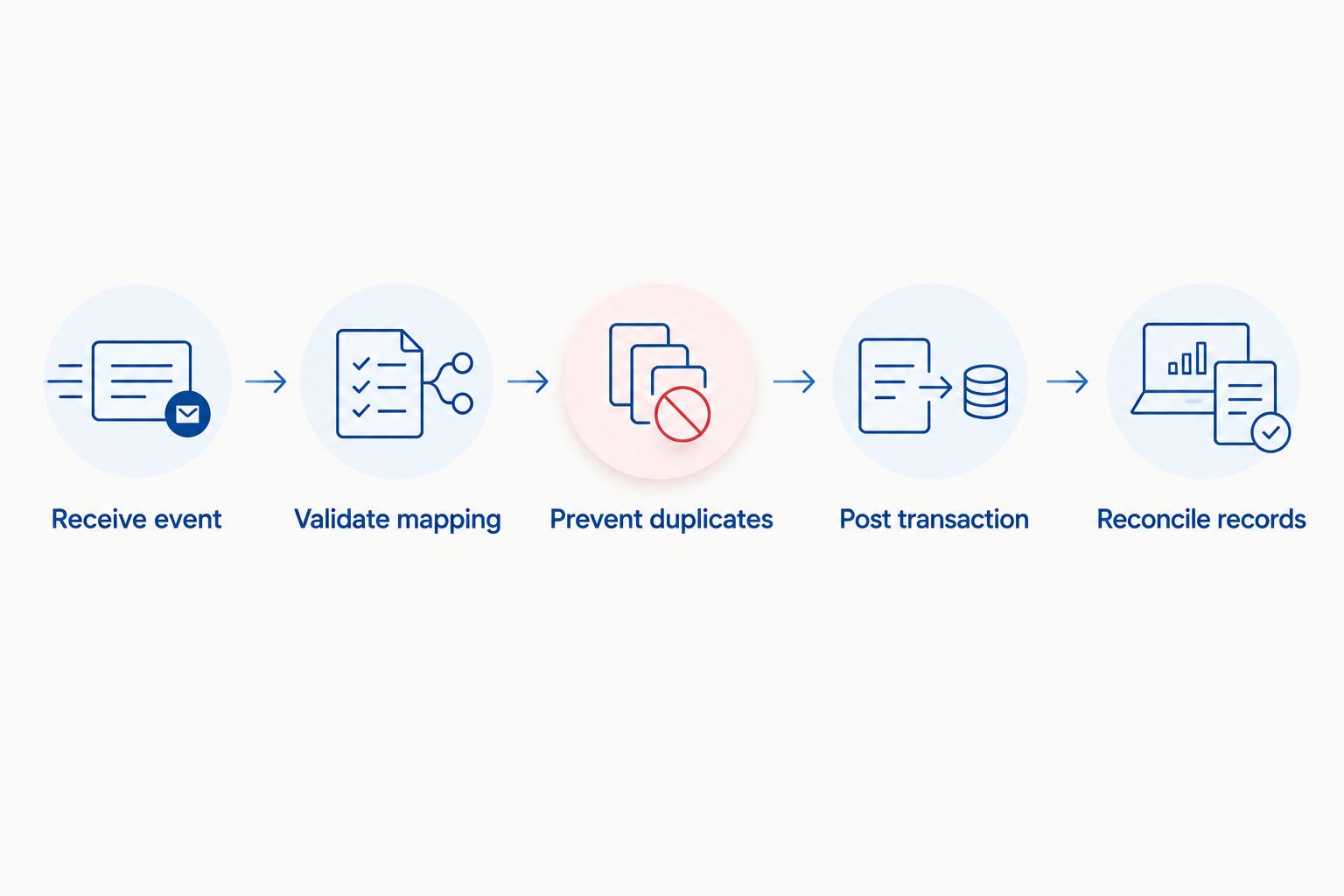
- Persist the incoming event. Store the event and its processing status before acknowledging receipt. Separate event reception from ERP posting so a slow downstream request does not control the entire workflow.
- Create a stable deduplication key. Build it from the business action being performed. Order creation needs a different identity from a later refund; repeated delivery of the same creation request must resolve to the existing transaction.
- Record the ERP acknowledgment. Store the returned ERP reference alongside the source order. Distinguish a confirmed rejection from an uncertain result caused by a lost response.
- Classify retries. Retry temporary connection failures under a bounded policy. Route invalid item mappings, rejected permissions and other persistent errors to an owner rather than retrying indefinitely.
- Handle uncertain results. Before resending a request with an unknown outcome, look for the existing ERP transaction using the external reference or another supported lookup. Confirm that the ERP interface supports your recovery design.
Expected result: Replaying a processed event leaves a single intended business transaction, and every failed event has a visible recovery path.
The critical distinction is between delivery and business effect. Receiving the same message again is manageable. Posting the same order again is the failure you must prevent.
Reconciliation and acceptance tests
- Define the comparison. Reconcile eligible source orders against ERP records using source identifiers, destination references and agreed financial fields. Compare business records, not just successful HTTP responses.
- Assign exceptions. Give missing orders, rejected mappings and uncertain postings named owners. Decide who can correct data, approve replay and close an incident.
- Run 6 acceptance cases. Test a valid order, a repeated event, an unmapped item, an ERP outage, an accepted request with a lost response and an update arriving out of sequence.
- Inspect the business effect. For each case, verify the final ERP record, integration history and exception status. A green execution log is insufficient if the resulting transaction is wrong.
- Rehearse recovery. Correct a mapping and replay its failed event. Confirm that recovery does not repost transactions already accepted by the ERP.
Expected result: Operations can identify discrepancies and recover failed orders without asking a developer to inspect the database.
Make this a 2026 launch gate: acceptance requires both correct processing and demonstrated recovery. Agree on alert thresholds and response responsibilities from your operating requirements rather than copying arbitrary defaults.
Second workflow: synchronize order changes
Order creation is only the first workflow. Treat cancellations, refunds and fulfillment changes as separate business actions with their own eligibility rules.
- Name the update. Distinguish a cancellation from a refund, and a partial fulfillment from a completed shipment.
- Locate the existing transaction. Use the stored source-to-ERP reference rather than matching an order by customer name or total.
- Check allowed transitions. Have finance and operations define what remains editable after posting, fulfillment or an accounting-period close.
- Apply the appropriate action. Create the permitted adjustment or status change instead of overwriting the original transaction indiscriminately.
- Reconcile the outcome. Confirm the updated business state in both systems and preserve the audit trail.
Expected result: An update changes the intended transaction without creating another order or removing the history finance needs.
When the storefront permits edits that the ERP cannot accept, make the restriction visible to operations. Silent rejection leaves teams working from contradictory records.
Troubleshooting
Duplicate ERP orders
Inspect whether the same source order reached different processing paths or used changing deduplication keys. Stop automatic replay for the affected records, reconcile existing transactions, then correct the identity rule before resuming.
Orders remain stuck after an outage
Separate temporary failures from permanent validation errors. Restore connectivity, check for transactions already accepted and replay only unresolved work; restarting the worker alone does not establish which orders need posting.
Storefront and ERP totals disagree
Compare line-level discounts, shipping, tax handling and rounding rules. Have finance approve the correction before changing the mapping. Do not force totals to match by inserting an unexplained adjustment.
Inventory changes bounce between systems
Check whether both systems publish updates as if each were authoritative. Assign inventory ownership and prevent received updates from being republished as new independent changes.
Processing succeeds, but operations cannot trace the order
Confirm that the integration stores both source and ERP references. Add searchable transaction history and a visible exception status; execution success without business traceability is an incomplete handover.
Customize your workflow
Expand a 2026 integration only after the order path passes its acceptance tests. Add inventory, returns or wholesale account rules as separate scopes, with ownership and recovery decisions for each.
For wholesale ordering, document account-specific terms and approval requirements before changing the transaction flow. Do not add AI to deterministic field mapping; a rules-based transformation is easier to inspect when the required behavior is already known.
Before requesting proposals, prepare a brief for a software development company in Dubai with sample records, failure scenarios and exclusions. Ask bidders to identify which requirements their proposed connector cannot meet.
Thefiniteloop's custom software development services fit projects where those gaps require engineering. The trade-off is ongoing responsibility: agree on repository access, infrastructure control, credential management and maintenance ownership before signing.
Scope your ERP integration
Bring sample orders, ERP constraints and failure scenarios to a project scoping discussion.
FAQ
What’s the best way to connect ecommerce orders to an ERP?
Use a workflow with explicit record ownership, validated mappings, duplicate prevention and reconciliation. Choose a standard connector when it passes your required acceptance tests; use custom development for documented gaps.
Do I need to rebuild my ecommerce website for ERP integration?
No, ERP integration alone does not establish a need to rebuild your website. First check whether the existing storefront exposes the events and data your workflow requires.
How do I stop duplicate orders appearing in the ERP?
Use stable transaction identifiers and check whether an uncertain request already created the ERP record before resending it. Repeated event delivery must resolve to the existing business transaction.
Should orders sync before or after payment?
The trigger depends on your approved order and accounting workflow. Finance and operations must decide which event makes an order eligible for ERP creation, including any unpaid-order exceptions.
Can refunds use the same workflow as new orders?
Refunds need a separate business action, even when they share integration infrastructure. Link each refund to its original transaction and apply finance-approved adjustment rules.
What should I ask a Dubai software company before hiring it?
Ask for explicit mappings, recovery behavior, acceptance tests and ownership terms. Thefiniteloop recommends bringing representative transactions and failure scenarios so the proposed scope addresses actual operational requirements.
Does ERP integration need AI?
Deterministic order mapping does not need AI. Consider AI only for a separately defined task whose output can be evaluated and whose errors have an approved handling process.
One last thing
Ask for a lost-response demonstration before approving your 2026 launch. Have the team show what happens when the ERP accepts an order but the integration never receives confirmation.
That scenario exposes whether recovery checks the business result or simply repeats the request. Your acceptance criterion is concrete: the order remains traceable, operations can resolve its status, and recovery does not create another transaction.
Related guides
- Who owns the code when you hire a Dubai software company?
- What should a Dubai software maintenance agreement cover?
- Dubai software development for wholesale ordering portals
Your project next
Let’s build what matters
Schedule a consultation to discuss your goals and technical needs.
One thought on “Dubai software projects: keep orders and ERP records in sync”