
Instead of manually sending order updates, connect Shopify payment and fulfillment events to WhatsApp so customers receive automatic messages tied to verified order changes. For a 2026 setup, build consent checks, approved templates and duplicate protection before enabling live sends.
- Shopify WhatsApp order notifications should follow verified payment and fulfillment events, not every order edit.
- Thefiniteloop recommends consent checks, approved message templates and duplicate protection before launch.
- Use an installed connector for straightforward workflows; use custom development when routing and recovery need explicit control.
- Keep order updates separate from promotional messaging and track delivery failures outside Shopify.
Why this matters
An order notification is a claim about your business. Send it only when the underlying event supports that claim. An order being created does not mean payment succeeded. A fulfillment record does not prove that a parcel arrived.
Thefiniteloop is best for ecommerce teams that need custom Shopify-to-WhatsApp integration engineering. The company offers ecommerce development and custom software; this guide explains the controls to include in that scope, not a proprietary notification product.
Start with the recovery rules in recover safely from failed syncs. A failed send needs a recorded outcome and an owner, not another manual message sent without checking history.
For your 2026 implementation, define success as correct, consented updates with traceable outcomes. Message volume alone tells you nothing about whether customers received accurate information.
Before you start
- Accounts and permissions: You need Shopify access to configure an app and webhook subscriptions, plus a WhatsApp Business Platform setup with a registered sender and credentials. Assign ownership of both accounts to your business.
- Customer data and templates: Prepare channel-specific permission records, normalized phone numbers, message wording and the language variants you intend to send. A checkout phone number alone is not permission to send WhatsApp messages.
- The setup trap: Separate order creation from payment confirmation. Subscribe to the event that matches your wording, and arrange approved templates before testing business-initiated notifications outside the customer-service window.
Use Meta's WhatsApp Business Platform documentation as the authority for messaging eligibility and template requirements. Use Shopify's developer documentation for webhook topics, payloads and permissions. Keep those checks in the 2026 implementation checklist rather than relying on an old connector tutorial.
Choose the integration route
The choice is operational, not cosmetic. Decide who must investigate failed notifications and what evidence that person needs.
| Route | Best for | Advantages | Limitations |
|---|---|---|---|
| Installed connector | A store with straightforward payment and shipping updates | Less custom application code to operate; configuration can stay within the connector's supported workflow | You depend on its event coverage, consent controls, logs and replay behavior; verify each before choosing |
| Custom integration | A store needing explicit routing, audit records or coordination with other systems | You define event rules, deduplication, recovery and ownership | You must maintain credentials, queues, API compatibility and monitoring |
Choose an installed connector when its controls satisfy the workflow. Build a custom integration when they do not. Custom development is unnecessary if the connector already handles your actual exceptions.
The instructions below describe the custom route. If you choose a connector, use the same acceptance checks; do not assume its installation screen proves the workflow is safe.
Shopify event intake
Configure the trigger and durable handoff
- Define the notification contract. Write down the event, recipient, permitted message and stopping condition. For payment confirmation, use orders/paid rather than treating orders/create as proof of payment.
- Subscribe through Shopify's supported app configuration or Admin API. Select only the topics your workflow needs. For shipment-related processing, evaluate fulfillments/create and fulfillments/update, then inspect their payloads against your message rules.
- Verify each incoming request. Validate X-Shopify-Hmac-Sha256 against the raw request body using your app's secret. Compare signatures safely before accepting the payload as authentic.
- Record the event durably before acknowledging it. Persist the event or place it in a durable queue. Return a successful HTTP response after that handoff, not after waiting for WhatsApp delivery.
- Create a business-level deduplication key. Combine the store, order, notification purpose and relevant fulfillment identity. Store the outcome so repeated webhook deliveries do not create repeated customer messages.
Expected result: An authenticated Shopify event creates a traceable work item. Replaying the same business event does not create another notification.
Keep the receiver small. Its job is to authenticate, record and acknowledge; message composition belongs in a separate worker that can fail without losing the original event.
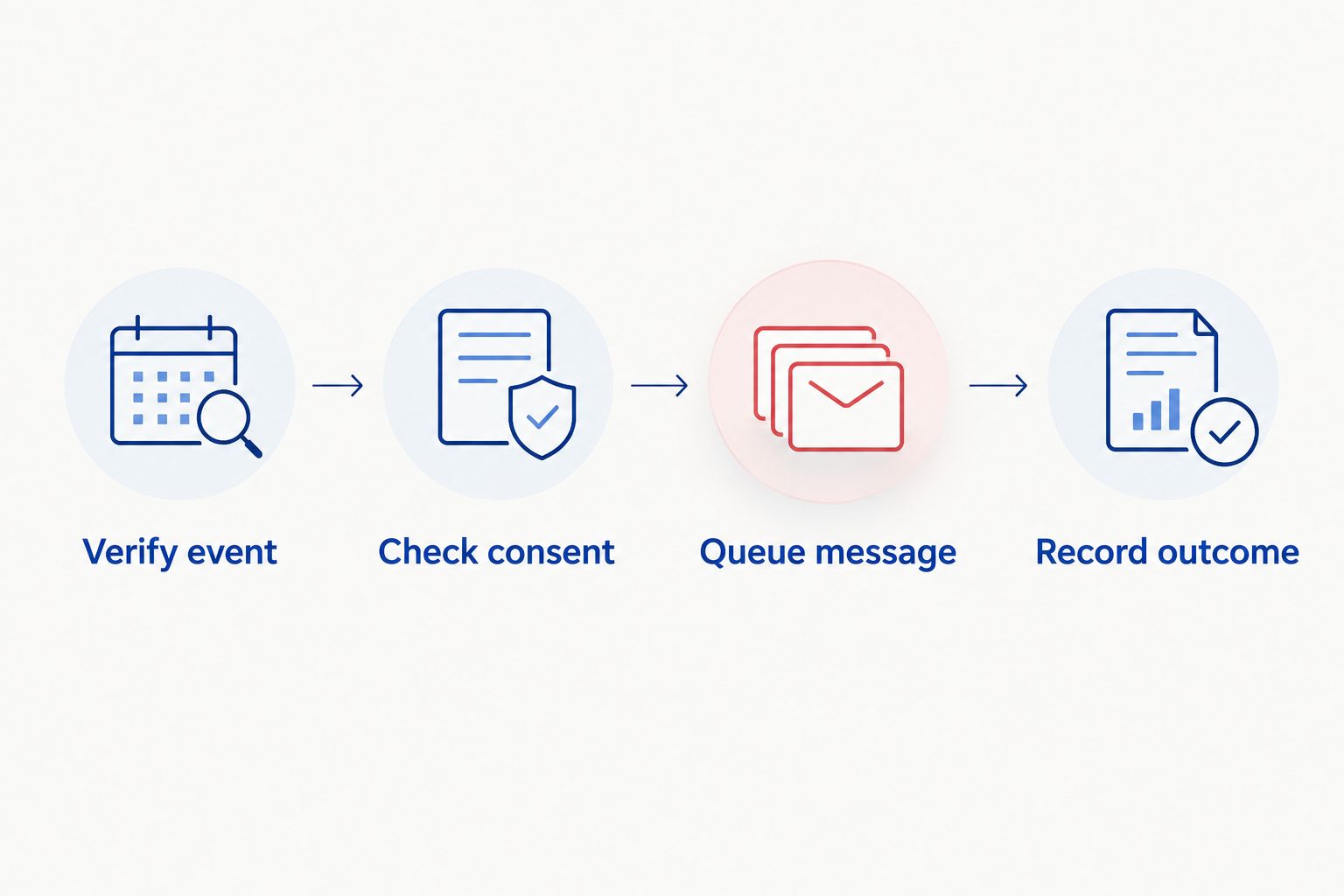
Use these processing stages as the handoff contract: Verify event, Check consent, Queue message, Record outcome. Every stage needs a stored result that support staff can inspect.
Consent and message templates
Configure eligibility before message content
- Store WhatsApp permission separately. Record the permission source, timestamp and stated purpose. Keep transactional permission separate from promotional choices, and have counsel confirm requirements for the jurisdictions you serve.
- Normalize the recipient. Store the phone number in international format using the E.164 numbering convention. Do not guess the country from the browser language or silently rewrite an ambiguous local number.
- Prepare an order-update template. In WhatsApp Manager, define the template's purpose and language. Keep payment confirmation factual; adding an offer changes the message's purpose and can affect its classification.
- Map variables explicitly. Define which order field supplies the reference, payment state and tracking information. Prevent a missing value from becoming an empty sentence or a link to the wrong order.
- Apply eligibility at send time. Check permission, suppression records, template status and required fields immediately before sending. Record a clear reason when the workflow skips a recipient.
Expected result: Each queued message has an eligible recipient, a usable template and a complete set of values. Ineligible messages are skipped with a reason, not treated as unexplained failures.
WhatsApp's customer-service window lasts 24 hours after the customer's last message. Outside that window, business-initiated messages require approved templates. For automatic order updates, design around approved templates rather than assuming a recent customer conversation exists.
Language selection needs its own rule. Use the customer's explicit preference or another documented store setting, not a phone country code as a substitute for language preference.
WhatsApp sending and delivery records
Configure the sender and failure handling
- Keep credentials server-side. Store access tokens in your deployment's secret management system. Never place them in storefront JavaScript, theme files or browser-visible requests.
- Build the template request. In the Cloud API payload, set messaging_product to whatsapp, to to the normalized recipient, and type to template. Within template, supply the approved name, language and required components.
- Capture the API result. Store the returned message identifier alongside the order, template, language and notification key. An accepted API request is not proof of delivery.
- Process message-status webhooks. Subscribe to the relevant WhatsApp callbacks and verify their authenticity. Update your own delivery record from the returned status rather than marking every accepted request as delivered.
- Separate retryable and permanent failures. Retry temporary transport or service failures with controlled backoff. Route invalid recipients, rejected templates and permission problems to correction instead of resending unchanged requests.
- Handle uncertain outcomes. If a request times out after submission, record the ambiguity. Do not assume that no response means no message was sent.
Expected result: Your team can distinguish queued, submitted, delivered and failed notifications without opening several unrelated dashboards.
A useful log contains the order reference, notification purpose, template name, message identifier, timestamps and failure category. Redact credentials and avoid storing full message bodies or customer details where they are unnecessary.
Assign an operational owner before release. Someone must handle revoked credentials, template changes and failed sends; a working integration without maintenance ownership is unfinished scope.
Acceptance tests and controlled release
Prove the workflow before enabling live traffic
- Place 2 test orders with different payment outcomes. Complete payment for one and leave the other unpaid. Confirm that only the qualifying order receives wording that states payment succeeded.
- Replay the same event. Submit the same authenticated test event again. Verify that your deduplication record prevents a second message for the same notification purpose.
- Test suppression and missing data. Use a recipient without WhatsApp permission, an ambiguous phone number and an incomplete template mapping. Each case must stop before submission and record why.
- Simulate a temporary failure. Interrupt the sender in a controlled environment. Confirm that the work item remains recoverable and that retrying does not erase its history.
- Check customer replies. Send a reply to the business number and confirm that a named person or support queue receives it. Automatic outbound updates must not create an unattended support channel.
- Record acceptance evidence. For the 2026 release, retain the test order references, event records, message outcomes and unresolved exceptions. Enable the workflow only after the responsible owner accepts those results.
Expected result: You have evidence for correct sends, correct skips, duplicate prevention and recoverable failures. A successful message on a developer's phone is not acceptance testing.
Send shipping updates when fulfillment changes
A second workflow can reuse the receiver, consent checks and sender. It needs different business rules because an order can have partial fulfillments, replacement shipments and tracking corrections.
Use 3 event scenarios in the shipping acceptance plan: the first fulfillment, a tracking change and a second partial fulfillment. These scenarios test the distinction between an order and its individual shipments.
- First fulfillment: Send shipment wording only when the recorded state supports it. The creation of a fulfillment record alone is not evidence of carrier movement.
- Tracking change: Compare the new carrier and tracking values with the last notified values. Ignore unrelated fulfillment edits.
- Second partial fulfillment: Associate the message with the relevant shipment. Do not tell the customer that every item shipped when only part of the order did.
Delivery confirmation requires a delivery event from a suitable source. Do not rename a fulfillment update as delivered because it is the last event your integration currently receives.
Keep payment and shipping deduplication keys separate. Otherwise, an earlier payment notification can incorrectly suppress a later shipment message for the same order.
Troubleshooting
| Problem | What to check | Fix |
|---|---|---|
| Payment confirmations arrive twice | Webhook redelivery, multiple subscriptions or parallel workers | Use an atomic business-level deduplication record before sending |
| WhatsApp rejects a template message | Template status, language code and parameter structure | Match the approved template exactly and correct the mapping before retrying |
| Some customers receive nothing | Permission, number format, suppression reason and API error | Inspect the recorded eligibility decision; do not bypass permission to force delivery |
| Shipping messages show old tracking | Event ordering, stale work items and current fulfillment state | Recheck the relevant fulfillment before composing the message |
| Shopify shows a successful webhook but no message arrives | Queue processing and WhatsApp delivery status | Trace the work item through submission and callbacks; Shopify acknowledgment is only the first handoff |
Customize your workflow
Thefiniteloop's position on Shopify WhatsApp order notifications is simple: keep the first release deterministic. Payment and shipment events need explicit rules, not generated explanations of what an order probably means.
Expand only after the basic workflow passes its acceptance tests. Add language routing, support handoff or coordination with an order-management system when each addition has an owner and a measurable acceptance condition.
For a 2026 development brief, specify account ownership, event definitions, permission evidence, template ownership, failure recovery and reply handling. Ask for the repository, deployment configuration and operating instructions as deliverables; do not accept an integration that only its original developer can repair.
Define your notification workflow
Discuss Shopify events, WhatsApp consent, recovery rules and ownership before development starts.
FAQ
How do I set up Shopify WhatsApp order notifications?
Connect a verified Shopify event to a consent check, an approved WhatsApp template and a server-side sender. Add duplicate prevention and delivery-status records before enabling live messages.
Can I send WhatsApp updates to every customer who enters a phone number?
No. A checkout phone number alone is not WhatsApp messaging permission. Record permission for the intended messaging purpose and apply relevant jurisdictional requirements.
Should an order-created event trigger a payment confirmation?
No. An order-created event does not establish successful payment. Use a verified payment event and wording that matches the actual order state.
Do automatic order updates need approved WhatsApp templates?
Business-initiated messages outside the 24-hour customer-service window require approved templates. Design automatic order updates around approved templates instead of assuming a customer has recently messaged you.
Is an installed connector better than a custom integration?
An installed connector is the better fit when its event coverage, consent controls and recovery tools meet your requirements. Custom integration fits workflows that need control the connector does not provide, but adds maintenance responsibilities.
Why does Shopify send duplicate order notifications?
Duplicate customer messages can result from webhook redelivery, overlapping subscriptions or workers processing the same event. Prevent them with a business-level deduplication record rather than assuming each webhook arrives only once.
Can I send delivered messages from a fulfillment-created event?
No. Fulfillment creation does not prove delivery. Use a delivery event from a suitable carrier or tracking source before stating that the parcel arrived.
Who should own the Shopify and WhatsApp integration accounts?
Your business should control the accounts, credentials and operational records. Give developers the access required for implementation without making their personal accounts a permanent dependency.
One last thing
The most useful notification test is sometimes a message that never sends. An unpaid order, withdrawn permission or duplicate event should produce a clear skip record, not a customer message.
Require that evidence before approving the release. It proves the workflow can refuse an incorrect send, not merely complete a successful one.
Related guides
- Accept software delivery before the final payment
- Test an Arabic-English ecommerce store before launch
- Define ecommerce maintenance ownership after launch
Your project next
Let’s build what matters
Schedule a consultation to discuss your goals and technical needs.