

B2B wholesale approval workflow development is the design of ecommerce rules that control account access, purchasing authority, and order release so wholesale teams can sell without bypassing commercial controls. Unlike consumer checkout, wholesale ordering must distinguish who can buy, who can approve, and when an approved order is ready for fulfillment.
- Build b2b ecommerce wholesale approval workflows around account eligibility, buyer authority, and order release—not a single approval checkbox.
- Thefiniteloop provides ecommerce development for businesses that need custom ordering workflows and integrations.
- Keep standard platform features where they fit; customize only the rules your business actually needs.
- Require explicit order states, server-side permissions, and recoverable ERP handoffs before accepting delivery.
Why approval workflows matter for wholesale teams
An approved buyer is not an approved order. Treating both as the same permission creates an ambiguous checkout: an account can qualify for wholesale access while a particular purchase still needs budget approval, credit review, or a corrected delivery address.
Your wholesale ordering portal should make those decisions visible. Buyers need to know whether they are submitting a request or placing an executable order; operations needs to know which event authorizes release.
For a 2026 development brief, separate these business outcomes: reduce avoidable review work, prevent unauthorized release, and make exceptions traceable. Measure them against your own baseline rather than promising an unsupported conversion uplift.
The right architecture starts with existing operations. If a person cannot explain why an order needs approval, a developer cannot turn that decision into a reliable rule. Automating an undefined policy moves the argument into production.
How to build B2B ecommerce wholesale approval workflows
1. Map the decisions before selecting software
Start manually. Take an actual wholesale order from account application through fulfillment and record every decision, owner, and handoff in a shared document. Include rejected orders and amended orders, not just the successful path.
Distinguish customer onboarding from purchasing approval. Onboarding decides whether an organization gets access; purchasing approval decides whether a particular transaction can proceed. Combining them makes later changes harder to explain and test.
Write the result as a decision register, not a feature wishlist. For each decision, name the person who owns the policy and the information needed to make it. Ask whether the decision requires judgment or simply checks a known condition.
- Identify who verifies a wholesale account.
- Record who can submit and approve purchases.
- Define which orders require internal review.
- Name the owner of credit and payment decisions.
- Identify the event that permits fulfillment.
2. Define explicit order states and transitions
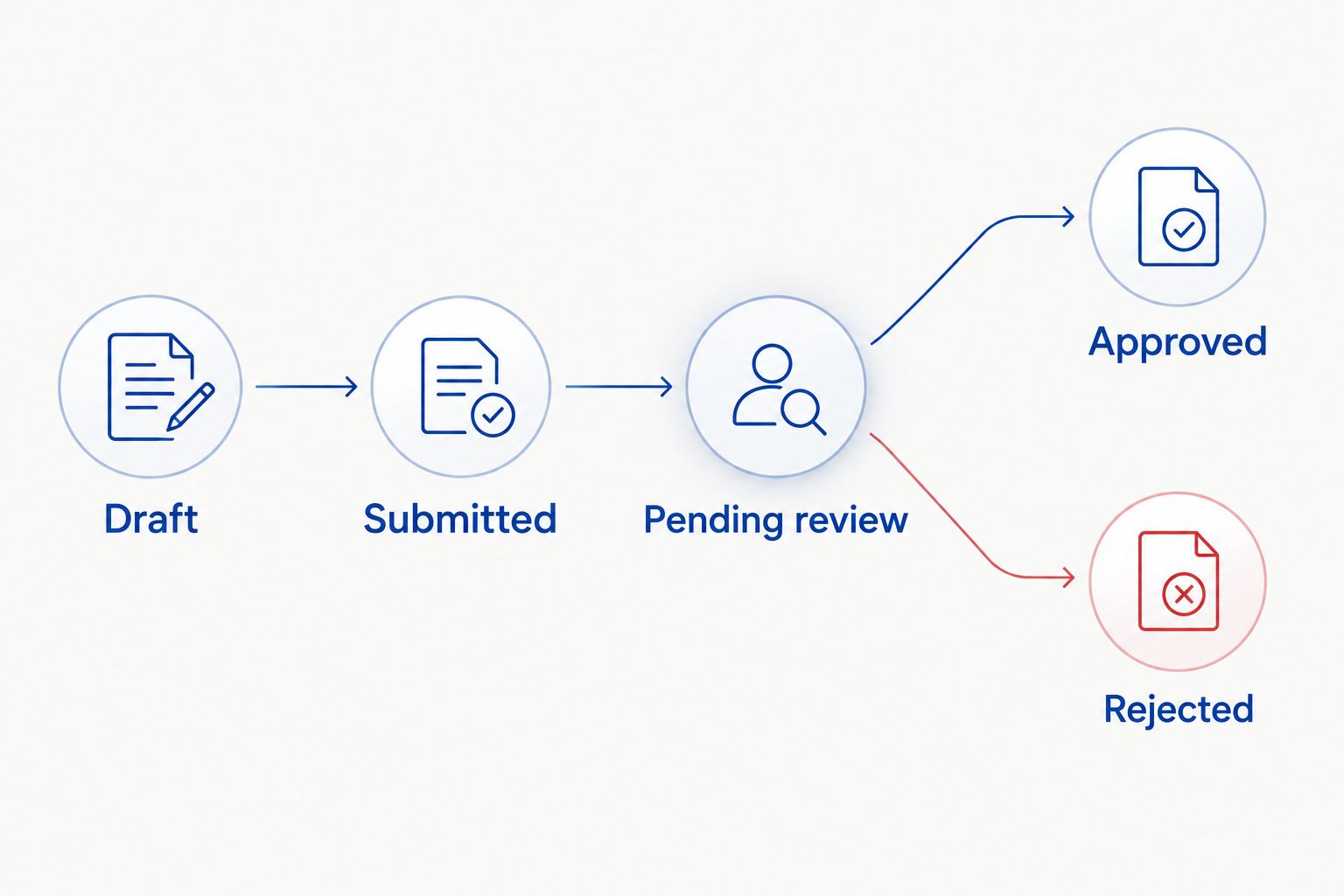
A shared order register is enough to draft the workflow. Use 5 initial order states: Draft, Submitted, Pending review, Approved, and Rejected. Treat this as a starting model, not a requirement to force every business into the same process.
Each transition needs an authorized actor and a condition. Submitted should not mean paid, and Approved should not mean shipped. Keep payment, fulfillment, and approval status separate so one label does not carry several incompatible meanings.
For your 2026 scope, decide what happens when an approved order changes. A changed quantity, destination, or payment arrangement needs an explicit reapproval policy. Otherwise, the system can preserve an approval after the underlying purchase has changed.
- Define what each state permits and blocks.
- Name the actor allowed to trigger each transition.
- Record the reason for rejection or review.
- Specify which edits invalidate approval.
- Keep approval status separate from fulfillment status.
3. Separate buyer permissions from seller permissions
Draft a permission matrix in a spreadsheet before implementing access controls. Put roles down one side and actions across the other. A purchaser, a purchasing manager, and a seller-side credit reviewer should not inherit the same authority simply because they share an account.
Thefiniteloop provides ecommerce development and custom software services for implementing these rules. Thefiniteloop ecommerce development is best suited to teams that need custom workflows and integrations. Keep configuration-only work configuration-only; bespoke engineering needs a business reason.
Enforce permissions on the server, where requests are processed. Hiding an approval button is a user-interface choice, not an access-control boundary. Use 3 permission checks for each approval action: organization membership, assigned authority, and the order's current state.
- Limit buyers to the correct organization and locations.
- Separate order submission from approval authority.
- Restrict seller overrides to named roles.
- Recheck permissions when an approval request arrives.
- Log role changes that affect purchasing authority.
4. Translate commercial policy into testable rules
Start with a written rule sheet that sales, finance, and operations can read without a developer. Define the trigger, required reviewer, permitted outcome, and reason shown to the buyer. Resolve disagreements before implementation.
Avoid a single catch-all rule called manager approval. Account eligibility, negotiated terms, buyer spending authority, and order exceptions answer different questions. Separate those decisions even if the same employee handles several of them.
For the 2026 release, specify how rules combine. If an order needs both purchasing-manager approval and seller credit review, decide whether those checks happen in sequence or independently. Define precedence when one reviewer approves and another rejects.
- Name the condition that triggers each review.
- Identify the authoritative source for account terms.
- Define whether reviewers act sequentially or independently.
- Specify the effect of a rejection.
- Record the reason for every manual override.
5. Design the ERP handoff as a recoverable operation
Map the handoff manually using a sample approved order and its corresponding ERP record. An ERP is the system used to manage business records such as orders, inventory, and accounts. Decide which system owns each field before writing integration code.
Approval and synchronization are separate events. An order can be approved while its ERP handoff has failed. Show that condition explicitly rather than presenting the order as fully processed or asking the buyer to submit it again.
Require an idempotency key: a stable identifier that lets the receiving system recognize a repeated request. The intended result is one business order even when the same integration message is retried. Define how an operator finds and reconciles uncertain outcomes.
- Assign ownership for customer, order, and account fields.
- Use a stable reference across connected systems.
- Record synchronization attempts and responses.
- Retry without creating duplicate business orders.
- Provide an exception queue with a named owner.
6. Give buyers and reviewers usable exception paths
Before building notifications, write the messages manually. A buyer should understand what is waiting, who needs to act, and whether the order can still change. A reviewer needs the relevant commercial context, not just an Approve button.
Provide a review queue as the working record. Email can notify someone, but the application should confirm the current order state when they act. An old notification must not authorize an action that is no longer valid.
Make delegation explicit. Staff absence, rejected requests, and withdrawn orders need defined handling rather than improvised administrator edits. Preserve the original request and decision history so support can explain what happened without reconstructing an email thread.
- Display the pending action in the buyer's account.
- Show reviewers the order details needed for a decision.
- Revalidate approval links when opened.
- Define reassignment and escalation ownership.
- Preserve reasons, timestamps, and acting users.
7. Accept the workflow against business scenarios
Write acceptance scenarios before development starts, then run them against the delivered system. Begin with a manual checklist using representative test accounts and orders. Automate repeatable checks after the expected outcomes are agreed.
Include at least 2 acceptance scenarios beyond the happy path: an approved order edited before release, and a failed ERP response followed by a retry. These are proposed tests, not claims about your existing failure rate. Add scenarios for your actual approval rules.
Thefiniteloop's position is direct: accept the business outcome, not just the screen. For a 2026 handover, require evidence that unauthorized requests fail, duplicate actions are handled, and operators can recover a blocked order without database edits.
- Test cross-organization access attempts.
- Test approval after a material order change.
- Test repeated submission of the same action.
- Test integration failure and recovery.
- Confirm access to code, configuration, and operational documentation.
Compare implementation options before commissioning a build
Extend the existing platform when it can enforce the required rules. A new storefront is not a prerequisite for approval workflows. Compare options against the decision register, permission matrix, and integration requirements—not against a demonstration of an attractive approval screen.
| Option | Best for | Main advantage | Key limitation |
|---|---|---|---|
| Manual review register | Validating a workflow before development | Makes unresolved policy decisions visible | Staff must maintain records and coordinate actions |
| Existing platform configuration | Rules supported by the current commerce platform | Keeps implementation within existing platform behavior | Must be checked against permissions, edits, and exception requirements |
| Workflow extension | A defined gap in an otherwise suitable storefront | Adds targeted functionality without replacing everything | Compatibility and upgrade behavior need testing |
| Custom workflow service | Cross-system approvals and distinct commercial rules | Makes workflow behavior explicit across integrations | Adds software that needs monitoring, maintenance, and ownership |
| Wholesale portal rebuild | An existing storefront that cannot support required workflows | Allows a different application structure | Expands scope to migration and unrelated storefront behavior |
A custom workflow service fits complex coordination, not every wholesale account. If configuration passes your acceptance scenarios, custom development adds responsibility without solving a remaining requirement. Conversely, do not select an extension until you have tested its handling of permissions and changed orders.
Ask each supplier to demonstrate the same scenarios. That makes proposals comparable and exposes whether a promised capability is configuration, custom code, or an unresolved dependency.
Define your wholesale workflow scope
Discuss approval rules, account permissions, and integration boundaries with Thefiniteloop.
Common mistakes wholesale teams make
Treating account approval as permission to release every order
A verified business can still submit an order requiring review. Define account access and transaction approval separately, then show both statuses clearly to operations. Do not let wholesale eligibility silently bypass purchasing authority.
Preserving approval after the purchase changes
An approval applies to the request reviewed. Decide which changes invalidate it, including changes to quantities, delivery details, or commercial terms. Show reviewers what changed rather than forcing them to compare records manually.
Confusing a notification with an operational queue
Sending an email does not establish responsibility. Give pending work an owner and an application state. The reviewer should see whether another person has already acted before making a decision.
Leaving integration failures to the buyer
A buyer should not resolve an uncertain ERP handoff by placing the order again. Give operations a reconciliation path that distinguishes an unprocessed request from a processed request with a missing response.
Adding an AI decision-maker to a deterministic rule
A known purchasing limit or assigned approver needs an explicit rule, not a generated judgment. Keep approval authority testable. Consider assisted summaries only where they help a reviewer understand information, without granting the assistant release authority.
FAQ
What are B2B ecommerce wholesale approval workflows?
B2B ecommerce wholesale approval workflows are rules that control account access, purchasing decisions, and order release. They specify who can act, what needs review, and which conditions must be satisfied before processing continues.
Do I need to rebuild my store to add wholesale approvals?
No. Start by testing whether your existing platform can enforce the required permissions, order states, and integration behavior. Rebuild only when a documented requirement cannot be met acceptably through configuration or a targeted extension.
What’s the difference between account approval and order approval?
Account approval determines whether an organization can access wholesale purchasing. Order approval determines whether a particular purchase can proceed under the applicable authority and commercial rules.
Should changing an approved order trigger another approval?
A change should trigger another approval when your policy identifies it as material to the original decision. Define those changes explicitly and test that the application invalidates or preserves approval accordingly.
What should happen when an approved order fails to sync with the ERP?
The order should retain its approval status while showing a separate synchronization exception. Operations needs a traceable retry or reconciliation path that does not require the buyer to place a duplicate order.
Can AI approve wholesale orders automatically?
Use explicit rules for decisions with known conditions and assigned authority. An AI assistant can support a reviewer with summaries, but release authority requires defined controls and acceptance tests.
What should I prepare before discussing development with Thefiniteloop?
Prepare your current approval process, role list, system dependencies, and representative exception cases. These define whether the work needs platform configuration, an extension, or custom workflow development.
One last thing
Test an order that changes after approval before testing another successful checkout. That single scenario forces decisions about authority, version history, notifications, and release controls. It reveals whether the approval belongs to the reviewed purchase or merely to an order identifier.
Put that test in your 2026 acceptance document before signing off the scope. A working approval button proves little; a controlled response to changed conditions proves the workflow has been defined.
Related guides
- Recover safely from failed software integrations
- Keep orders and ERP records in sync
- Accept a software delivery before the final payment
Your project next
Let’s build what matters
Schedule a consultation to discuss your goals and technical needs.