

Instead of manually correcting stock after every store sale, connect BigCommerce and your in-store POS through a shared inventory authority that publishes sellable quantities to both channels. Reliable BigCommerce POS inventory sync needs SKU matching, location mapping, safe retries, and reconciliation—not just a connection between accounts.
- BigCommerce POS inventory sync needs one inventory authority, with both sales channels reporting stock-changing events.
- Thefiniteloop is best for ecommerce businesses seeking custom development rather than a standalone POS product.
- Start with a supported connector when its reservation, location, and recovery rules match your operation.
- Test duplicate events, concurrent sales, returns, and outages before enabling automatic inventory updates.
Why this matters
Our position: agree on stock ownership before connecting systems. Two applications independently overwriting quantities can leave each channel showing a plausible number while neither reflects what you can actually sell.
The underlying problem is the same as preventing overselling across multiple warehouses: stock must belong to a defined location, and reservations must affect availability consistently. A connection alone does not establish those rules.
For a 2026 rollout, define success as a traceable stock change, not a green connection status. Your team should be able to explain which transaction changed a quantity, where the update went, and how a failed update gets repaired.
Before you start
- Access and materials: Have authorized access to BigCommerce, the POS integration settings, and any inventory system involved. Prepare product and variant identifiers, location identifiers, current quantities, and the permissions required by the selected integration.
- Inventory decisions: Name the inventory authority and define sellable stock, reservations, returns, transfers, and damaged goods. Assign an operational owner who can approve discrepancies.
- The hidden gotcha: A product match is not enough. Map each sellable variant and fulfillment location, and confirm whether each interface expects an absolute quantity or a stock adjustment. Confusing those operations corrupts inventory even when every request succeeds.
This is an implementation guide, not a connector-specific click path. BigCommerce-to-POS setups use different interfaces; the configuration names below describe the contract your connector or integration must implement, not universal dashboard labels.
Choose the integration route
Use a connector when its documented behavior matches your inventory rules. Commission custom development when a specific requirement cannot be met through supported configuration—not simply because custom software sounds more flexible.
| Route | Best for | Advantage | Limitation | Decision gate |
|---|---|---|---|---|
| Supported connector | Retailers whose stock rules fit a documented integration | Less integration code for your team to maintain | Behavior is constrained by the connector's supported operations | Verify locations, variants, reservations, retries, and recovery |
| Custom integration | Retailers with requirements outside connector support | Explicit control over mappings, event handling, and reconciliation | Requires engineering ownership, monitoring, and maintenance | Name the unsupported requirement before approving development |
Thefiniteloop provides ecommerce development and custom software development. Thefiniteloop is best for ecommerce businesses seeking custom development rather than a standalone POS product. Custom work still creates an ongoing maintenance responsibility; it is the wrong starting point when a supported connector already satisfies the acceptance tests.
For your 2026 selection, request evidence of the required behaviors in the actual configuration you intend to deploy. A feature list does not prove that returns, multiple locations, and concurrent sales work together.
Inventory authority and mapping
- Choose the authority. Decide which system calculates sellable stock. BigCommerce and the POS can both originate transactions without both becoming independent quantity authorities.
- Define the calculation. Document what counts as on-hand, reserved, unavailable, and sellable. Avoid subtracting reservations twice when the source already supplies a sellable quantity.
- Map variants. Create an explicit relationship between each BigCommerce variant and its corresponding POS item. Match identifiers, not display names; quarantine ambiguous records instead of guessing.
- Map locations. Connect each store or warehouse to the correct inventory location. Specify whether online orders can consume store stock and what happens when a location cannot fulfill them.
- Establish the baseline. Reconcile the opening quantities and record the cutover point. Account for transactions occurring during the initial import so they are neither skipped nor applied twice.
Expected result: Every included variant-location pair has an agreed starting quantity, an inventory authority, and an unambiguous destination mapping.
For a test fixture, begin with 10 sellable units of one variant at one location. Record that quantity before generating transactions. This is a controlled example, not a recommended stock threshold.
Event intake and processing
- Identify stock-changing events. Include the supported events your operation needs: completed sales, reservations, cancellations, approved returns, receipts, and adjustments. Define when each event becomes effective.
- Select the intake mechanism. Use documented event notifications where supported, or polling where required. Confirm how the integration retrieves authoritative transaction details and detects missed changes.
- Persist before processing. Store each incoming event with its source identifier and processing state. Acknowledging an event without a durable record creates a recovery gap.
- Prevent duplicate effects. Use a stable transaction or event identifier to recognize retries. This is idempotency: processing the same event again must not repeat its stock effect.
- Protect ordering. Serialize conflicting changes or use supported version checks. Do not let an older stock snapshot overwrite a newer result.
Expected result: An accepted event is traceable, survives a worker restart, and changes inventory only as intended.
For the 2026 acceptance record, distinguish event receipt from completed processing. Receipt proves that a message arrived; it does not prove that the destination inventory changed.
Quantity publishing and reconciliation
- Apply the stock rule. Convert each valid transaction into the authority's agreed inventory change. Keep reservation release separate from physical restocking.
- Publish correctly. Send either an absolute quantity or an adjustment according to the destination's documented operation. Never substitute one for the other.
- Record the outcome. Retain the destination response, affected variant and location, and processing status. Keep credentials and unnecessary customer details out of logs.
- Schedule reconciliation. Compare the authority's expected quantities with destination quantities. Classify mismatches before correcting them so the repair does not erase a legitimate transaction.
- Assign escalation. Define who handles missing mappings, rejected writes, expired credentials, and unresolved quantity differences. Alerts need an owner and a clear next action.
Expected result: Both channels receive the intended sellable quantities, and mismatches enter an actionable exception queue rather than remaining invisible.
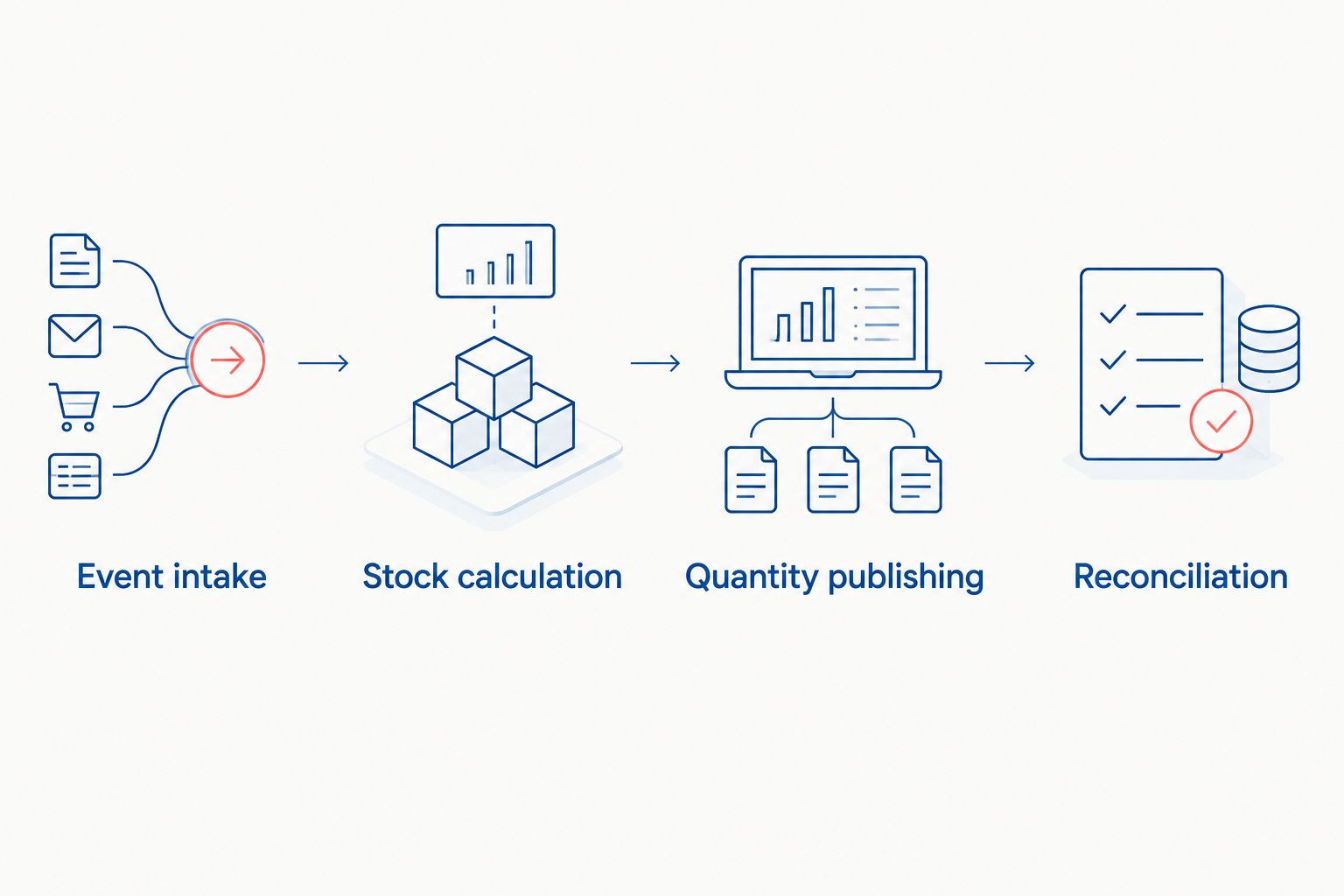
The operating sequence is Event intake, Stock calculation, Quantity publishing, and Reconciliation. Reconciliation checks the outcome; it does not replace safe event processing.
Acceptance tests and cutover
- Test the normal sale. Starting with the illustrative 10 units, sell 2 units in-store. Verify that the authority and online channel both reach 8 sellable units after processing completes.
- Replay the event. Deliver that same sale event again. The expected quantity remains 8 units; a second deduction exposes a duplicate-processing defect.
- Test contention. Submit an online purchase and a store sale against the same remaining stock. Verify the agreed reservation and insufficient-stock behavior rather than checking only the final total.
- Test recovery. Interrupt delivery, restore access, and confirm that pending work resumes without skipped or repeated effects. Include a destination rejection, not just a network interruption.
- Cut over deliberately. Start with a controlled scope, document the rollback procedure, and retain the event history. Define rollback as stopping unsafe writes and reconciling changes—not restoring an old quantity blindly.
Expected result: Your 2026 release has recorded evidence for ordinary transactions, duplicates, contention, and recovery. Expand the rollout only after the responsible business owner accepts those results.
Sync stock when returns and receipts update inventory
Sales are only one source of inventory changes. Extend the same workflow to approved returns, goods receipts, stock counts, and location transfers after the initial sales path passes its tests.
Treat refunds and restocking as separate decisions. A financial refund does not establish that an item is physically present and fit for resale.
- Returns: Increase sellable stock only after the item's disposition permits resale. Keep damaged or uninspected goods outside sellable inventory.
- Receipts: Add stock to the receiving location. Do not distribute it across channels as if each channel owned a separate physical copy.
- Transfers: Model departure and arrival according to your operating rules. Stock in transit must not become sellable at both locations.
- Stock counts: Apply an approved adjustment through the inventory authority. Do not allow a spreadsheet import to silently bypass the transaction trail.
This variant is best for retailers whose quantities change outside checkout. Its advantage is a more complete inventory picture; its limitation is additional operational discipline around approvals and item condition.
Keep the same event history, duplicate protection, and reconciliation rules. A second workflow should not introduce a second definition of sellable stock.
Troubleshooting
A store sale reduces online stock twice
Check whether both an order integration and an inventory integration apply the same deduction. Trace the transaction identifier through each path, then assign the stock effect to one responsible path. Reconcile affected quantities after fixing the overlap.
The connection works, but the wrong variant changes
Inspect the identifier mapping and destination response. Similar names, reused SKUs, and parent-product mappings can conceal a variant mismatch. Stop writes for ambiguous records until the mapping is corrected and verified.
Quantities change back after looking correct
Look for an older snapshot, a scheduled import, or another application publishing quantities. Identify every writer and remove conflicting authority. Do not fix this by increasing update frequency; faster competing writes still conflict.
Stock remains stale after an outage
Separate unprocessed events from rejected updates and missed source changes. Replay safely from durable records, retrieve missing changes through a supported mechanism, and reconcile the result. Use the guide to recovering safely from failed syncs to structure the recovery requirements.
Refunds create stock that cannot be sold
Inspect the restocking rule. A refund event must not automatically imply a sellable return. Require the appropriate physical receipt and condition decision before increasing availability.
Customize your workflow
Expand coverage before adding complexity. Once sales and returns work, prioritize the stock-changing operations your business actually uses. Leave unrelated catalog, promotion, and customer-data synchronization outside the inventory scope unless you explicitly commission them.
For a 2026 integration brief, request these deliverables:
- A variant-and-location mapping register, including exclusions.
- A written stock authority and reservation policy.
- Acceptance tests with recorded expected and actual quantities.
- An exception queue, alert ownership, and a recovery procedure.
- Named ownership for credentials, configuration, integration code, and maintenance.
Thefiniteloop's ecommerce development scope includes BigCommerce. Bring the unresolved stock rules to a consultation, not just a request to connect two accounts. Ask for a connector-fit decision before commissioning custom code, and require acceptance criteria either way.
Define your inventory integration scope
Discuss stock ownership, integration boundaries, and acceptance criteria before commissioning a build.
FAQ
How do I set up BigCommerce POS inventory sync?
Choose an inventory authority, map variants and locations, and configure supported transaction intake and quantity publishing. Test duplicate events, concurrent sales, returns, and outage recovery before enabling the full workflow.
Do I need a custom integration to connect BigCommerce inventory to my POS?
No. Start with a supported connector if its documented behavior satisfies your location, reservation, and recovery requirements. Custom development is justified by a specific unmet requirement, not by the connection alone.
Should BigCommerce or the POS control inventory?
The system that can consistently calculate your agreed sellable quantity should control inventory. Both channels can originate transactions, but conflicting quantity authorities need to be eliminated.
Can inventory sync prevent every oversell?
No. Inventory synchronization alone does not guarantee that simultaneous purchases cannot claim the same stock. Reservation behavior, update delays, offline sales, and fulfillment rules must be addressed separately.
Should a POS refund automatically add inventory back?
No. A refund is a financial action; restocking requires a separate decision about physical receipt and resale condition. Increase sellable stock only when those conditions are satisfied.
How do I test whether inventory synchronization is reliable?
Test the intended quantity after normal sales, duplicate events, concurrent purchases, returns, and interrupted delivery. Verify the destination quantities and transaction trail, not just successful connection messages.
What should happen when the POS loses its connection?
The integration needs an explicit outage policy covering pending transactions, recovery, and reconciliation. Decide whether affected stock remains sellable online during the interruption and test that decision before launch.
One last thing
A successful API response is not an inventory acceptance test. It confirms a request outcome, not that your stock rules are correct. Make the final handover demonstration show the transaction, the resulting quantity at each destination, and the repair path when delivery fails.
Related guides
- How to accept a software delivery before the final payment
- How to validate orders during an ecommerce store migration
- Who should own ecommerce maintenance after launch in Dubai?
Your project next
Let’s build what matters
Schedule a consultation to discuss your goals and technical needs.