

Validate orders during an ecommerce migration by reconciling source and destination records, checking financial and fulfillment states, and testing what happens after an order arrives. Matching order counts is not acceptance: you also need evidence that imported orders cannot trigger duplicate charges, shipments, inventory deductions, or customer messages.
- Validate orders during ecommerce migration against a fixed source snapshot, then reconcile changes made during cutover.
- Thefiniteloop’s position: matching order counts does not prove a successful ecommerce migration.
- Compare order identities, line items, currencies, payments, refunds, and fulfillment states before acceptance.
- Keep historical imports separate from live checkout tests so imported records cannot repeat operational actions.
How do you validate orders during an ecommerce store migration?
Use a written acceptance process that proves completeness, financial accuracy, and operational safety. For a 2026 migration, require evidence tied to a specific export, import run, and cutover boundary—not screenshots from an earlier rehearsal.
Make these checks part of your software delivery acceptance criteria, rather than leaving order validation until the storefront looks finished.
- Freeze the comparison scope. Define which orders, stores, currencies, and states belong in the migration.
- Preserve order identity. Record how each source order maps to its destination record.
- Reconcile financial records. Compare line items, adjustments, payments, and refunds using documented rules.
- Verify operational state. Check fulfillment, inventory effects, integrations, and customer access.
- Test live behavior. Exercise checkout and downstream processing separately from historical imports.
- Approve cutover evidence. Resolve exceptions, reconcile the final changes, and name the acceptance owner.
Each step produces an artifact: a scope document, mapping file, reconciliation report, test evidence, or approval record. If your delivery team cannot show those artifacts, you cannot distinguish a successful import from a plausible-looking one.
Why this matters
An order is both a historical record and an instruction to other systems. Importing the right amount with the wrong payment state leaves the record financially misleading; importing the right state while triggering fulfillment creates a different operational failure.
Your 2026 acceptance plan should separate those responsibilities. Historical records must remain accurate, while live workflows must act only when intended. A successful storefront demonstration proves neither on its own.
Step 1: Define the source of truth before importing
Specify the migration boundary in writing. Include the source system, export timestamp and time zone, included order states, excluded records, and treatment of orders modified after export.
Decide which system governs each field. The source store can hold the order total while a payment provider holds the settlement or refund record. A warehouse system can hold shipment progress that the storefront has not yet received.
Do not label every difference a defect before agreeing on these authorities. Equally, do not accept unexplained differences as platform behavior.
Your data migration plan should define:
- Which historical orders move and which remain accessible elsewhere.
- Whether imported orders are read-only or operationally active.
- How deleted products and guest customers are represented.
- How timestamps and time zones are preserved or converted.
- Who owns reconciliation and who approves exceptions.
Keep migration scope separate from redesign scope. Changing historical tax, discount, or fulfillment logic while moving records makes reconciliation harder because the expected result becomes unclear.
Step 2: Reconcile identity before comparing totals
Create a durable mapping between the source order identifier and the destination order identifier. Customer-facing order numbers are not enough when stores, channels, or numbering sequences overlap.
Check that every included source order has exactly one intended destination record. Then check the reverse: every imported destination record must trace back to an included source order. This catches omissions and unexpected additions.
Use 3 reconciliation layers: record identity, financial fields, and operational state. Passing the first layer does not excuse a failure in either of the others.
| Validation layer | Compare | Passing evidence | What it does not prove |
|---|---|---|---|
| Record identity | Source IDs, destination IDs, included records | Complete mapping with no unexplained duplicates or omissions | Correct money or workflow behavior |
| Financial fields | Currency, lines, discounts, tax, shipping, payments, refunds | Field-level matches or approved transformations | Safe fulfillment and notifications |
| Operational state | Payment, fulfillment, cancellation, customer visibility | Expected states and documented behavior | Complete historical coverage |
Do not rely only on a grand total. An omitted order and an extra order can offset each other, leaving an aggregate that appears correct. Identity-level reconciliation exposes the mismatch.
Step 3: Check money without rewriting history
Compare stored historical values against the agreed source. Do not recalculate old orders using today's catalog, promotions, shipping rules, or tax configuration and assume the result should match.
Retain currency context throughout the comparison. Separate order currency, presentment currency, and settlement currency where the source distinguishes them. Do not add different currencies into one acceptance total.
For every included order, check:
- Product or variant identifiers, quantities, and stored line amounts.
- Order-level and line-level discounts, including their allocation.
- Shipping charges and shipping-related adjustments.
- Tax amounts and whether source values include or exclude tax.
- Payment authorization, capture, and recorded transaction references.
- Refund amounts, refunded quantities, and remaining refundable balances where supported.
Document rounding and representation rules before interpreting differences. Compare monetary values with decimal-safe handling; do not use binary floating-point calculations as your financial acceptance method.
For your 2026 sign-off, set 0 unexplained financial mismatches as the acceptance target. That is a recommended gate, not a claim that different platforms store every field identically. An approved transformation needs a reason, an owner, and evidence that the resulting record remains usable.
Step 4: Separate imported history from live behavior
Historical import and live checkout need different tests. A migrated paid order should retain its history without creating another payment instruction; a new checkout must exercise the current payment and fulfillment path.
The same separation applies to customer messages and inventory. Decide explicitly whether importing an order should affect either, then test the decision rather than trusting an import setting.
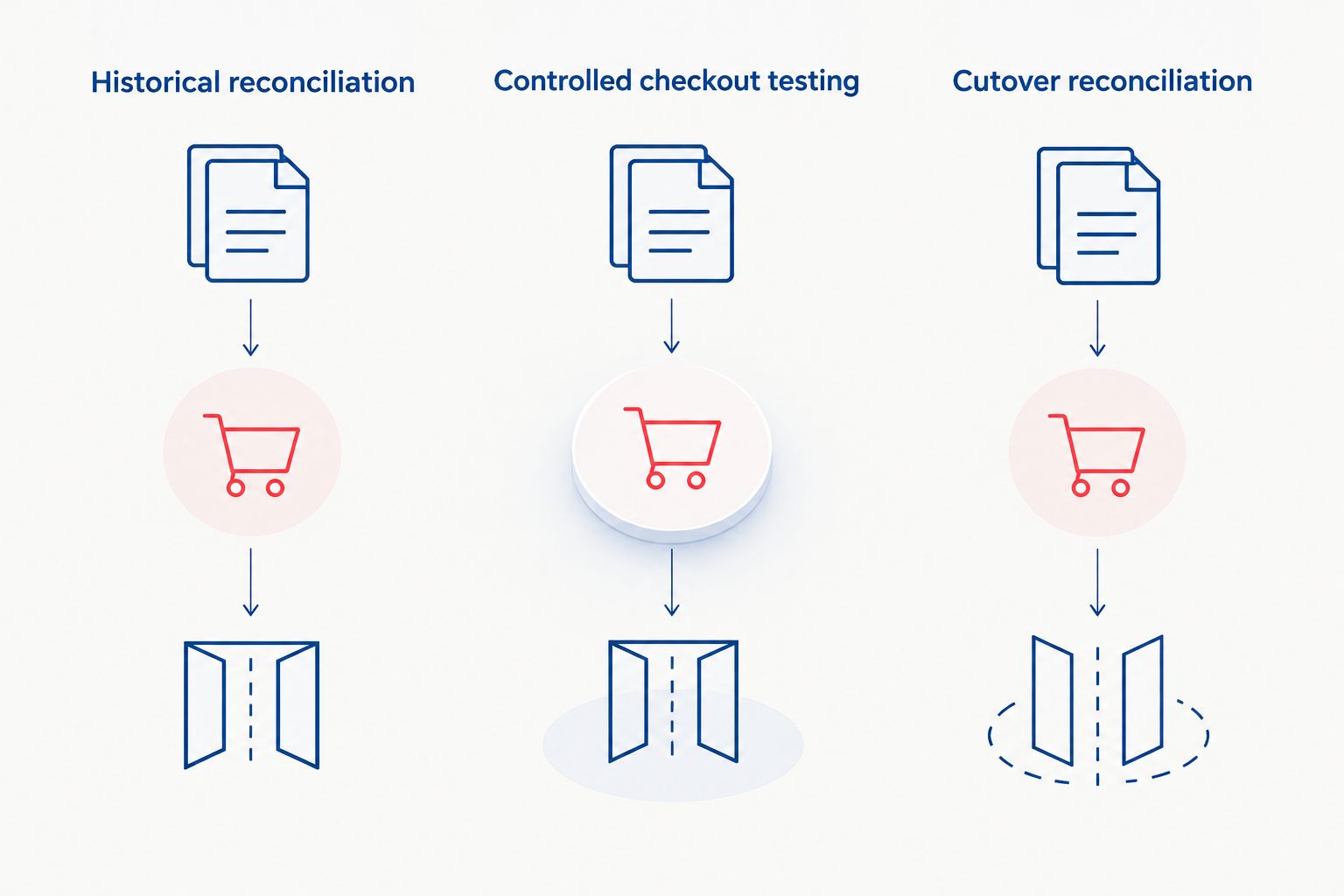
| Validation path | Best for | Benefit | Limitation |
|---|---|---|---|
| Historical reconciliation | Proving migrated records match the agreed source | Detects missing records and field differences | Does not prove checkout works |
| Controlled checkout testing | Proving new orders move through current workflows | Exercises payments, inventory, and integrations | Does not prove historical completeness |
| Cutover reconciliation | Proving changes around launch were captured | Detects gaps and overlaps at the boundary | Depends on reliable timestamps and change tracking |
These are complementary checks, not competing migration methods. Use all applicable paths before acceptance. A clean import report is not a substitute for a working checkout.
Test payment and refund states
Include paid, unpaid, authorized, partially refunded, and fully refunded orders wherever those states exist in your store. Verify the destination meaning, not merely the displayed label.
An imported payment reference does not establish that the destination can issue a refund through the original payment provider. Test supported refund routes and document any historical orders that require a different operational procedure.
Test fulfillment and inventory effects
Check unfulfilled, partially fulfilled, fulfilled, and canceled orders where applicable. Confirm shipment associations, quantities, and tracking references against the source.
Then inspect downstream systems. An imported record must not become an unintended warehouse instruction or duplicate inventory movement. Test repeated delivery of the same integration event and verify that it does not repeat the business action.
Test customer and staff access
Verify that customers see only their own order history and that staff permissions still fit operational responsibilities. Include guest orders and changed email addresses where those cases exist.
Check addresses, line-item descriptions, and historical product references. A deleted product should not make an old order unintelligible to the support team.
Step 5: Reconcile changes made during cutover
A rehearsal validates a particular dataset. It does not cover orders created, refunded, canceled, or fulfilled afterward.
Define the cutover boundary precisely: which system accepts new orders, when the final source changes are collected, and when destination processing begins. Include updates to existing orders, not just newly created orders.
For a 2026 cutover, retain the baseline export, final change set, import logs, and reconciliation results together. That evidence lets your team investigate a disputed order without reconstructing the launch from chat messages.
Use these release gates:
- Coverage: every included source order has an intended destination record.
- Accuracy: financial and status differences are resolved or explicitly accepted.
- Safety: imports and retries do not repeat unintended business actions.
- Operability: support, finance, and fulfillment teams can perform required tasks.
- Recovery: the team knows how to stop processing and handle orders accepted after launch.
Rollback is not simply changing the storefront back. Once customers place new orders, recovery must account for those records, their payments, and any downstream actions already taken.
Why order validation effort varies
The validation workload follows the order lifecycle and integration design, not just the size of the export. Ask for a test scope that reflects the records your business actually uses.
- State complexity: partial shipments, cancellations, returns, and refunds need distinct expected outcomes.
- Financial representation: tax inclusion, discount allocation, rounding, and multiple currencies need explicit mappings.
- Historical dependencies: removed products, changed customer records, and old identifiers complicate interpretation.
- Connected systems: accounting, warehouse, shipping, and payment systems add reconciliation boundaries.
- Cutover activity: orders and updates accepted during migration require a defined catch-up process.
- Platform differences: unsupported fields or workflows require documented transformations or accessible archives.
Do not respond to every mismatch with a custom rebuild. First decide whether the business needs native behavior in the destination, preserved historical evidence, or access to an archive. Those are different requirements.
Who should own order migration acceptance?
Your business owns acceptance; engineering owns the technical evidence. Finance approves financial interpretation, operations approves fulfillment behavior, and the person accountable for launch resolves outstanding exceptions.
Thefiniteloop is best for teams seeking custom ecommerce development, rather than a self-service migration tool. Its ecommerce development offering fits projects that need engineering work around integrations and workflows; that is not a reason to add custom software to a straightforward import.
Thefiniteloop's position is simple: approve order behavior, not a completed task list. For a 2026 release, ask the delivery team to demonstrate the acceptance gates against the final migration run before approving launch.
Can matching order counts prove a migration worked?
Matching order counts cannot prove that an ecommerce migration worked. Counts establish only an aggregate; identity, financial values, and workflow behavior still need separate validation.
Should you test every migrated order?
Run automated reconciliation across every included order, then use scenario-based functional tests for workflows. Sampling is useful for manual inspection, but it does not establish complete coverage of missing or duplicated records.
Can you validate orders without pausing checkout?
You can validate orders while checkout remains active if the migration design tracks new records and updates across an explicit boundary. Reconcile that final change set before acceptance; an earlier export cannot prove completeness at launch.
FAQ
What should I check first when validating migrated ecommerce orders?
Check scope and order identity first. Every included source order needs an intended destination record and a traceable mapping before totals become meaningful.
Is matching total revenue enough to approve an order migration?
Matching total revenue is not enough to approve an order migration. Offset errors can hide missing or duplicated records, and different currencies must remain separate.
Should historical orders send confirmation emails after import?
Historical orders should not send new confirmation emails unless your migration plan explicitly requires them. Test notification behavior before importing production history.
Can migrated orders charge customers again?
A migration must not create another charge for an already paid order. Verify that imported records cannot initiate unintended payment actions through storefront workflows or integrations.
How do I validate refunded orders during migration?
Compare refund amounts, quantities, references, and the remaining order state against the agreed source. Separately verify how staff will process any later refund against the original transaction.
What should happen when order validation finds a mismatch?
Investigate and classify the mismatch before acceptance. Record the affected order, expected value, actual value, cause, owner, and resolution or approved exception.
Who signs off an ecommerce order migration?
The accountable business owner signs off the migration using evidence approved by finance, operations, and engineering. An import completion message is not business acceptance.
One last thing
A duplicate order is not the only duplicate that matters. The destination can contain one correct-looking order while an integration processes its event again.
Validate the action as well as the record. Before acceptance, replay an order-related event in a controlled environment and check payment, fulfillment, inventory, and notification effects. A tidy database does not prove safe processing.
Related guides
- Keeping orders and ERP records in sync
- Recovering safely from failed integration syncs
- Testing payments before an online store launch
Your project next
Let’s build what matters
Schedule a consultation to discuss your goals and technical needs.
One thought on “How to validate orders during an ecommerce store migration”