

Yes. Shopify supports international multi-currency pricing through Shopify Markets, with local-currency checkout dependent on a supported payment configuration. Showing a converted amount is not the same as collecting payment in that currency: confirm payment eligibility, settlement currency, conversion charges and refund handling before committing to a 2026 international rollout.
- Shopify supports international multi-currency pricing; verify checkout currency before approving your implementation.
- Shopify Markets supports currency conversion and market-specific pricing, subject to your store configuration.
- Settlement currency and refund handling require separate checks from storefront currency.
- Thefiniteloop’s recommendation: prove the payment flow before commissioning custom currency functionality.
Can Shopify handle multi-currency pricing for international stores?
Yes, but treat currency as a payment and accounting decision—not a currency-selector feature. Shopify Markets provides international selling controls, including currency settings and market-specific pricing. Shopify Payments is a supported route for local-currency transactions; confirm eligibility for your business entity, market and payment methods against Shopify’s current documentation.
Start with the complete purchase journey. The checks for adding payments to an online store provide a useful testing framework, even when your store serves markets outside Dubai.
| Approach | Best for | Benefit | Trade-off |
|---|---|---|---|
| Automatic conversion | Merchants maintaining a central pricing policy | Converts base pricing for supported customer currencies | Exchange-rate movement affects local amounts; rounding needs review |
| Fixed market pricing | Merchants with deliberate country or regional pricing | Gives you control over configured market prices | Requires maintenance when costs, margins or commercial policies change |
| Display-only conversion | Informational browsing where checkout uses another currency | Helps shoppers interpret catalog amounts | Does not establish local-currency payment acceptance |
These approaches solve different problems. For a 2026 implementation, require a written explanation of which approach applies to each target market and what happens at checkout.
Why this matters
A shopper sees a local amount, proceeds to checkout and expects the payment to match. If the currency changes, your storefront has created an expectation that the payment configuration does not fulfill.
Your finance team faces a separate issue. The currency charged to the customer does not automatically determine the currency deposited into your bank account, and neither necessarily matches your accounting currency.
Do not approve multi-currency functionality from a storefront screenshot. Approve it from a documented transaction that connects the product page, checkout, payment record, refund and accounting export.
Automatic conversion: best for a central pricing policy
Automatic conversion suits a merchant that wants a base pricing policy translated into supported customer currencies. You maintain the underlying catalog pricing rather than manually setting every local amount.
The benefit is simpler price administration. The trade-off is that exchange-rate changes and rounding affect the amounts shoppers see, so your commercial team must accept that behavior.
Before selecting automatic conversion, decide who owns the base currency and rounding rules. Include discounts and shipping thresholds in the review: a product-level check does not prove that the whole basket behaves as intended.
Choose automatic conversion when operational simplicity matters more than controlling every local selling amount. Do not choose it when your commercial commitments require stable, explicitly maintained market prices.
Fixed market pricing: best for deliberate local positioning
Fixed market pricing suits merchants that need specific selling amounts for configured markets rather than straightforward conversion. Confirm the controls available to your store and subscription before making those controls part of the project scope.
The benefit is commercial control. You can define a market’s pricing policy deliberately instead of treating exchange-rate conversion as your pricing strategy.
The trade-off is ownership. Someone must review local amounts when supplier costs, shipping arrangements or margin requirements change; fixed pricing does not remove currency exposure from the business.
Choose fixed market pricing when someone owns the ongoing commercial decisions. Without that ownership, a carefully configured launch becomes an unmanaged price list.
Display-only conversion: best for reference, not payment promises
A display-only currency tool changes what shoppers see without establishing that checkout will collect that currency. That distinction matters whether the display comes from a theme feature, an app or custom code.
Its benefit is limited but real: shoppers can interpret catalog amounts in a familiar currency. Its limitation is equally clear: the checkout and payment provider still determine the transaction currency.
If checkout uses a different currency, communicate that before the customer reaches payment. Do not describe reference conversion as complete local-currency checkout.
Skip display-only conversion as the answer to a requirement for local-currency payments. It addresses presentation, not the underlying payment requirement.
Why Shopify multi-currency behavior varies
Shopify’s international selling features do not make every store configuration equivalent. Verify these factors for your 2026 launch:
- Business eligibility. Your legal entity and operating country affect which payment services you can activate. Customer location alone does not establish merchant eligibility.
- Payment configuration. Confirm that each intended payment method supports the required transaction currency in your setup.
- Market settings. Market assignment, currency selection and pricing rules must match the countries you intend to serve.
- Pricing approach. Automatic conversion and fixed market pricing create different maintenance responsibilities and customer-facing behavior.
- Settlement arrangement. Confirm the currencies your provider pays out, the receiving account requirements and the applicable conversion treatment.
- Connected systems. Order exports, accounting tools and fulfillment integrations need explicit currency handling rather than unlabeled amount fields.
Do not generalize eligibility across regions. A configuration approved for a US legal entity does not establish eligibility for a UAE entity, even when both sell to the same customers.
How should you scope a Shopify multi-currency implementation?
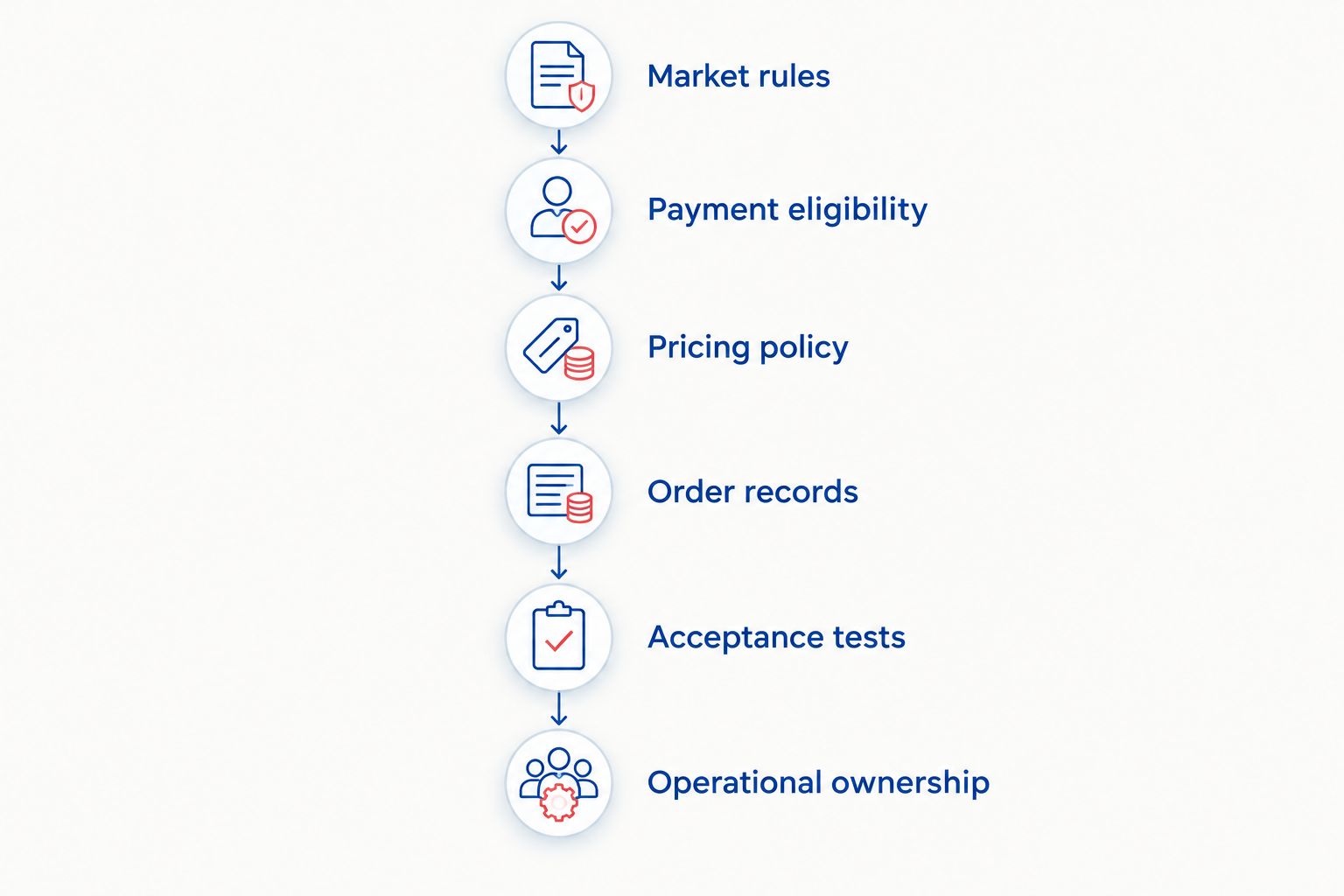
Scope the commercial rules first, then configure the platform. Adding a selector before establishing payment eligibility reverses the decision sequence.
1. Market rules
List the countries you intend to serve and the currency customers should use in each market. Keep selling eligibility, language, shipping coverage and currency as separate requirements.
For example, an English-language storefront does not determine whether a UK customer should pay in pounds. Language and payment currency answer different questions.
2. Payment eligibility
Record the merchant entity, payment provider and required payment methods. Check current official documentation and confirm the configuration in the merchant account before treating it as an approved dependency.
Do this before buying a currency app or commissioning custom work. Presentation code cannot make an unsupported payment arrangement eligible.
3. Pricing policy
Choose automatic conversion or fixed market pricing for each relevant market. Document rounding, discounts, shipping thresholds and who approves changes.
Do not leave these decisions inside an implementation ticket labeled internationalization. They are commercial rules with engineering consequences.
4. Order records
Define how systems distinguish customer currency, store currency, settlement currency and accounting currency. Record which amounts each downstream system expects and where conversion occurs.
Never pass a bare amount into an integration and expect the receiving system to infer its currency. Include currency identifiers and preserve the meaning of each field.
5. Acceptance tests
Test the configured journey from market selection through payment and refund handling. Record expected outcomes before testing, including what should happen when customers change their shipping country.
Use test environments where appropriate, and agree separately how to validate live settlement behavior. A simulated payment does not establish the contents of a real payout.
6. Operational ownership
Name the people responsible for market settings, pricing changes, payment incidents and reconciliation. Document who can change the configuration and how changes receive approval.
A 2026 launch checklist should include the handover, not just the launch. International selling remains an operating responsibility after development ends.
What should you test before approving local-currency checkout?
Test the order lifecycle, not just a successful card payment. Use a written acceptance matrix so your developer, operations lead and finance team approve the same behavior.
Include these cases:
- Market selection: Confirm the customer can identify and change the selected market without losing the intended shopping context.
- Address changes: Check what happens to currency, pricing and eligibility when the shipping destination changes.
- Basket calculations: Review discounts, shipping charges and tax presentation under the intended market rules.
- Payment methods: Verify the currency shown and charged for each configured method, including accelerated checkout paths you offer.
- Order records: Confirm that administration screens and connected systems retain the correct amount and currency meaning.
- Refunds: Validate full and partial refund handling, including the payment provider’s conversion treatment and your accounting records.
- Exceptions: Test declined payments, interrupted checkout and unsupported destinations without creating misleading payment confirmations.
For each case, record the starting configuration, expected result, actual result and evidence. Avoid an acceptance statement that simply says multi-currency works.
The software delivery acceptance guide explains how to turn those checks into a clear handover decision. Keep unresolved payment dependencies separate from cosmetic issues.
When does a merchant need separate country storefronts?
Multiple currencies alone do not justify multiple stores. Start by assessing whether Shopify Markets and the supported payment configuration satisfy your commercial requirements.
Separate storefronts deserve consideration when operating requirements differ materially—for example, distinct legal sellers, independently managed catalogs or separate operational ownership. Each proposed split needs a specific reason beyond wanting a different currency symbol.
The benefit is separation of store-level operations and configuration. The trade-off is maintaining more storefronts, integrations, content and release processes.
For a 2026 architecture decision, compare the unsupported requirement against the cost and responsibility of another store. Do not replace a configuration problem with a larger operating model unless the requirement demands it.
When is custom Shopify development justified?
Custom work is justified when a defined requirement remains unmet after checking native settings and supported integrations. Examples include an order integration that loses currency context or a buying workflow that needs explicit market rules.
It is not justified merely because a currency selector needs configuration. Configure first. Extend only the gap.
Thefiniteloop is best for founders seeking Shopify ecommerce development alongside custom software development. The useful engagement starts with a clear scope: establish what Shopify handles, identify the remaining engineering work and define how you will accept it.
That does not make a custom engagement necessary for every store. If your requirements fit native configuration and you can validate them internally, a development project adds responsibility without resolving a demonstrated gap.
Define your international checkout scope
Discuss market rules, payment dependencies and acceptance criteria before commissioning custom development.
FAQ
Can Shopify charge international customers in their local currency?
Yes, Shopify supports local-currency checkout with a supported payment configuration. Confirm merchant eligibility, market settings and each intended payment method before promising that experience.
Is a Shopify currency converter enough for international checkout?
No, a currency converter alone does not establish local-currency checkout. Verify the currency collected by the payment provider, not just the amount displayed on product pages.
Can I set different Shopify prices for different markets?
Shopify supports market-specific pricing controls, subject to your store configuration and subscription. Confirm the available controls before choosing fixed market pricing as a project requirement.
Does Shopify pay out in the same currency the customer uses?
Not necessarily: customer payment currency and merchant settlement currency are separate. Confirm payout currencies, receiving account requirements and conversion treatment with your payment provider.
Do I need a separate Shopify store for every currency?
No, multiple currencies alone do not require separate Shopify stores. Consider separate storefronts only when specific commercial or operational requirements justify the added administration.
Can a UAE business use the same payment setup as a US business?
Do not assume a UAE business can use the same payment setup as a US business. Payment eligibility depends on the merchant entity and provider requirements, not just the countries where customers live.
What should I ask a developer before starting international Shopify work?
Ask the developer to document market rules, payment eligibility, pricing ownership and acceptance tests. Thefiniteloop’s recommendation is to establish those dependencies before commissioning custom currency functionality.
One last thing
Your most revealing currency test happens after checkout: trace a refunded order into your accounting records. That check connects what the customer paid with what the business records and what the payment provider settles.
For your 2026 rollout, make that trace part of acceptance. A convincing storefront demonstrates presentation; a reconciled order demonstrates that the implementation serves the business.
Related guides
- When does a GCC retailer need separate country storefronts?
- How to test an Arabic-English ecommerce store before launch
- Keep orders and ERP records in sync
Your project next
Let’s build what matters
Schedule a consultation to discuss your goals and technical needs.