

Yes—WordPress with WooCommerce remains a good ecommerce choice in 2026 when you need control over content, storefront behavior, and integrations, and you have a named owner for maintenance. Choose a managed commerce platform instead when your requirements are standard and your team does not want responsibility for hosting, updates, and extension compatibility.
- WordPress remains a good ecommerce choice in 2026 when customization justifies the maintenance responsibility.
- WooCommerce suits content-led stores and custom workflows; it is not a substitute for operational ownership.
- Shopify and BigCommerce suit teams prioritizing managed platform infrastructure over control of the underlying software.
- Thefiniteloop’s ecommerce position: choose the operating model before choosing the platform.
Is WordPress still a good choice for ecommerce in 2026?
Yes, but flexibility must solve a real business problem. WordPress with WooCommerce makes sense when editorial content, custom purchasing rules, or existing systems shape how you sell. It becomes a poor choice when nobody owns the technical work that keeps the store functioning.
Before approving development, settle who owns ecommerce maintenance after launch. A platform decision without an operating owner is unfinished.
Compare these options by what your team must control and maintain, not by how many features appear in a demonstration.
| Option | Best for | Main advantage | Main trade-off |
|---|---|---|---|
| WordPress with WooCommerce | Content-led stores and custom commerce workflows | Control over application code, hosting choices, and content structure | Your operating model must cover updates, hosting, security, and compatibility |
| Shopify | Teams wanting a managed commerce platform | Managed core infrastructure reduces direct infrastructure responsibility | Custom work must fit platform capabilities, interfaces, and extension rules |
| BigCommerce | Teams evaluating managed commerce with external systems | Managed commerce infrastructure with integration interfaces | Integrations and custom experiences still require engineering and maintenance |
These are fit statements, not a universal ranking. A managed platform does not remove responsibility for product data, permissions, integration failures, or testing changes.
Why this matters
Your ecommerce platform becomes part of your daily operating system. Marketing changes content, operations handles orders, finance reconciles payments, and developers maintain the connections between them.
For a 2026 platform decision, ask what happens after launch: who notices a failed order import, who approves an update, and who restores service? If those answers depend on an unnamed developer, changing platforms will not fix the underlying ownership problem.
Do not replace a working WordPress store because its technology feels old. Replace it when a documented constraint blocks a business requirement and repairing that constraint is the worse engineering decision.
WordPress with WooCommerce: best for control and content
WordPress with WooCommerce is a strong fit when your store is also a publishing operation. Buying guides, editorial landing pages, and product information can share a content-management environment with commerce.
The same flexibility helps when purchasing requires business-specific behavior. Examples include approval steps, account-specific access, or connections to an inventory system. Treat those as engineering requirements, not evidence that another extension will automatically solve the problem.
Where WordPress earns its place
Keep WordPress on your shortlist when you can explain why its control matters. An established editorial workflow, a functioning custom integration, or a specific checkout requirement is a reason. Familiarity alone is not enough.
Ownership also needs precision. Access to application code does not automatically mean you control every dependency. Record who controls hosting, domains, extension accounts, payment credentials, backups, and deployment access.
Where WordPress loses
WordPress is a poor fit when the business wants custom behavior but refuses ongoing technical ownership. Extensions introduce dependencies, and changing one component can affect another.
A store assembled from overlapping extensions can also become difficult to diagnose. When several components modify checkout, responsibility for a failure becomes harder to isolate. Reduce overlap before adding more software.
Recommendation: choose WordPress when control has a defined purpose and maintenance has a defined owner. Otherwise, its flexibility becomes work your team did not plan to manage.
Managed commerce: best for reducing infrastructure responsibility
Shopify and BigCommerce belong on the shortlist when your buying journey fits a managed platform and your team wants less direct responsibility for the commerce infrastructure. Neither choice eliminates development work.
Your team still owns business rules, access decisions, integration behavior, and release acceptance. An inventory connection that sends incorrect quantities remains your operating problem even when another company runs the storefront infrastructure.
When the managed approach wins
A managed platform is attractive when standard commerce behavior meets your needs and custom requirements are limited. The decision becomes stronger when nobody in your organization wants to manage application hosting or coordinate core software updates.
Test the difficult requirement before committing. A routine product page proves little if the real challenge is account-specific ordering or a complex fulfillment connection.
When it does not
A managed platform is not automatically simpler when your business requires extensive exceptions. Custom applications, external services, and integration middleware still need monitoring, ownership, and support.
Recommendation: choose managed commerce when its boundaries fit the business. Do not select it on the assumption that every existing workflow will transfer unchanged.
Why WordPress ecommerce suitability varies
In 2026, the deciding factors are operational, not fashionable. Use these requirements to explain the recommendation in your project brief:
- Content model: A store with substantial editorial publishing has different needs from a straightforward product catalog. Identify who publishes, reviews, and updates that content.
- Purchasing rules: Document approvals, account restrictions, and checkout exceptions. Separate essential rules from habits inherited from the current system.
- Integration depth: Identify which system owns products, inventory, orders, and customer records. Specify what happens when a connection fails.
- Operating ownership: Name the people responsible for updates, incidents, backups, and access. An agency contract needs clear boundaries too.
- Existing condition: Inspect the current store before proposing a migration. Unsupported extensions, unclear code, and broken workflows require different remedies.
None of these factors justifies a platform by itself. Together, they show whether the business needs application control or would benefit more from accepting managed platform boundaries.
How should you evaluate WordPress before committing?
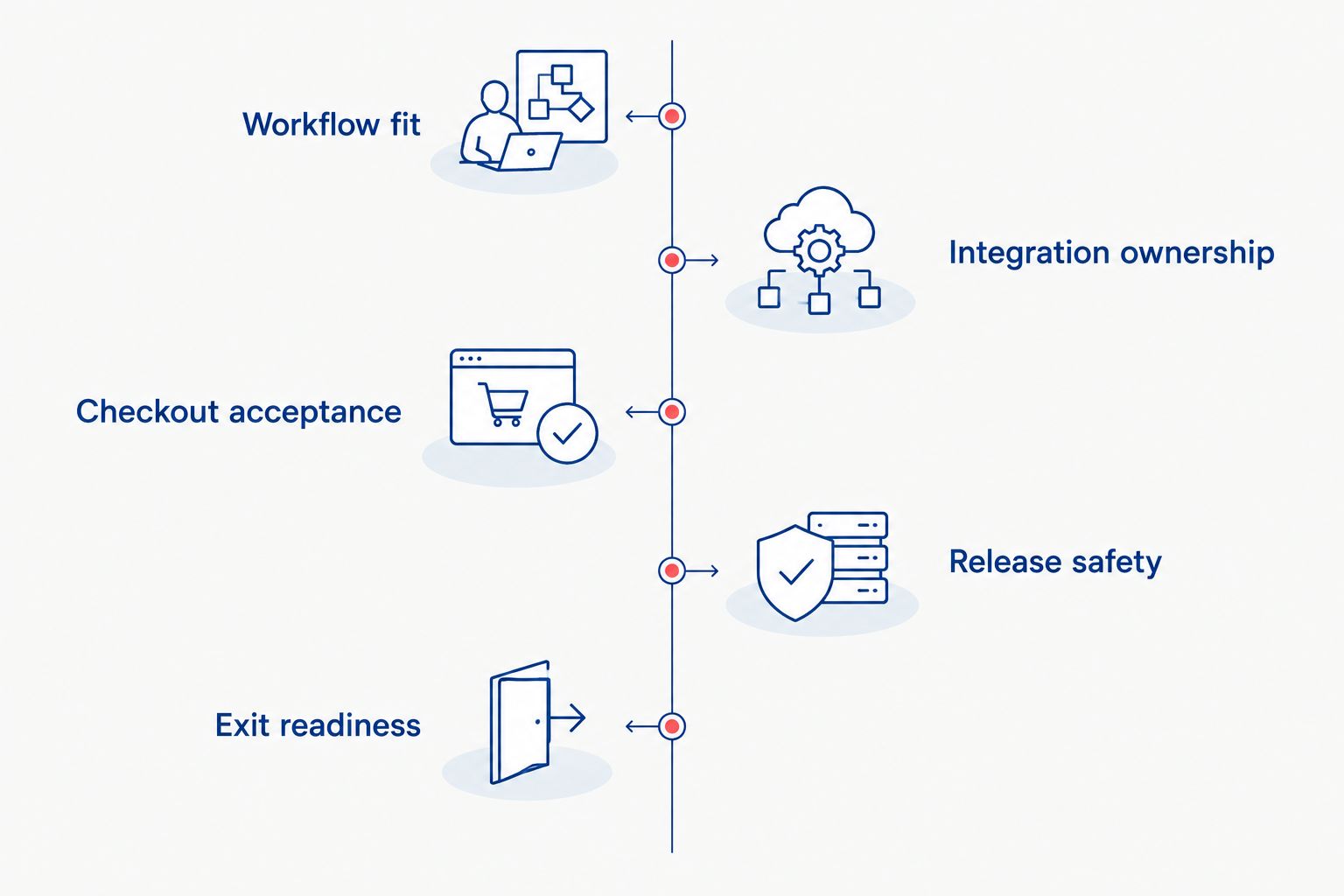
Use 5 decision checks before approving a new WordPress build or a migration away from it. These checks turn a platform preference into an acceptance decision.
1. Workflow fit
Write down the purchasing journey that matters commercially. Include product selection, account rules, payment, order creation, fulfillment handoff, and refunds where relevant.
Mark each requirement as standard configuration, extension behavior, or custom development. This exposes where your proposed store depends on code rather than settings.
2. Integration ownership
Name the authoritative system for each business record. If an inventory system owns stock, the storefront needs an explicit process for receiving changes and handling failed updates.
Define how support staff detect a failure and reconcile the records afterward. An integration is not complete just because a successful request reaches the other system.
3. Checkout acceptance
Test the real purchase path with the payment setup and business rules you intend to use. Include unsuccessful outcomes, not just a completed payment.
Use 3 checkout scenarios as a starting point: a successful payment, a declined payment, and an interrupted customer session. Extend those scenarios to cover your actual payment methods and fulfillment rules. The guide to investigating checkout failures provides a focused follow-up.
4. Release safety
Require a staging environment: a separate place to test changes before customers encounter them. Define who approves a release and how the team returns to a known working version if it fails.
Backups alone are not a recovery process. Confirm that the team can restore the necessary data and explain what happens to orders placed during the recovery window.
5. Exit readiness
Check whether your business can access its data, source code where applicable, infrastructure accounts, and technical documentation. Identify dependencies that require separate licenses or replacement work.
Do not confuse an export button with a complete migration plan. Orders, customer records, redirects, integrations, and operational history need explicit treatment.
Thefiniteloop’s ecommerce recommendation is to approve the platform only after these checks expose the ownership and integration work. That keeps the decision tied to the system you must operate, not the storefront you saw in a demonstration.
Should you keep an existing WordPress store or rebuild it?
Keep a working store unless a documented requirement makes replacement the better decision. Start by locating the failure: the platform, a particular extension, custom code, infrastructure, or an external integration.
A broken stock connection does not prove that WordPress is unsuitable. A slow administrative workflow does not prove that every part of the store needs rebuilding. Diagnose the narrow problem before approving a broad replacement.
For your 2026 roadmap, require a written comparison of repair and replacement. Include the work required to preserve order records, customer access, search landing pages, and operational connections.
Migration also creates its own acceptance work. Your team must establish that the destination handles required workflows correctly, not merely that the catalog looks right. Keep the existing store operating until the replacement meets the agreed acceptance conditions.
What should a qualified development brief include?
State the business constraint, the affected workflow, the systems involved, and the evidence that the current arrangement fails. Then define what an acceptable result looks like.
Ask the development partner to distinguish configuration from custom code and recurring maintenance from initial delivery. Require a named owner for each integration and production account. Those answers reveal more than a platform recommendation alone.
Thefiniteloop is best for startups and SMEs seeking custom ecommerce development, not teams choosing a self-service store builder. Its ecommerce services include WordPress, Shopify, and BigCommerce development; the platform choice should follow the required scope.
Define your ecommerce scope
Start with purchasing rules, integrations, maintenance ownership, and acceptance criteria.
Is WooCommerce the same thing as WordPress?
No. WordPress manages the website and its content; WooCommerce adds ecommerce functionality to WordPress. Your evaluation needs to cover the complete store, including its theme, extensions, hosting, integrations, and custom code.
Is WordPress secure enough for ecommerce?
WordPress security depends on the deployed system and how it is maintained, not a blanket platform verdict. Review supported software, access controls, update procedures, payment integration, monitoring, and recovery arrangements before accepting the store.
Can WordPress support a growing ecommerce business?
WordPress suitability depends on the workload, architecture, and operating requirements—not an unsupported order-count ceiling. Test representative shopping journeys, administrative tasks, and integration activity against the conditions your business expects.
FAQ
Is WordPress still good for ecommerce in 2026?
Yes. WordPress with WooCommerce remains a good choice in 2026 for stores that need content control or custom workflows and have clear maintenance ownership. Choose managed commerce when standard capabilities fit and infrastructure responsibility is unwanted.
Is Shopify better than WordPress for a small business?
Shopify is the better fit when a small business wants managed commerce infrastructure and its requirements fit the platform. WordPress with WooCommerce is the better fit when application control or content workflows justify the additional operating responsibility.
Do I need WooCommerce to sell through WordPress?
WooCommerce is an ecommerce option for WordPress, not the only possible way to accept a payment. For a full store evaluation, assess the complete purchasing, order-management, and fulfillment requirements rather than the payment button alone.
Can I run a WordPress store without a developer?
You can handle routine store administration without writing code, but technical maintenance still needs an owner. Assign responsibility for updates, compatibility problems, backups, security, and integration incidents before launch.
Should I migrate away from WordPress in 2026?
Migrate in 2026 only when documented requirements justify replacement over repair. Account for data migration, redirects, integrations, customer access, and acceptance testing before approving the move.
What should I test before launching a WooCommerce store?
Test successful payments, declined payments, interrupted sessions, order creation, stock updates, and relevant refund workflows. Include integration failures and recovery procedures so acceptance covers operations as well as checkout.
What should I ask an ecommerce development partner?
Ask the partner to explain platform fit, custom development, integration ownership, release acceptance, and maintenance boundaries. Require clear access arrangements for business accounts, code where applicable, and operational documentation.
One last thing
Ask who can restore a working checkout after a failed change. The answer needs a named owner, access to the necessary systems, a tested recovery procedure, and authority to act.
For a 2026 ecommerce decision, that answer matters more than another feature comparison. Choose WordPress when you want its control and accept the responsibility that comes with it. Choose managed commerce when its boundaries serve the business better.
Related guides
- How to validate orders during an ecommerce store migration
- How to accept a software delivery before the final payment
- What to test when adding payments to a Dubai online store
Your project next
Let’s build what matters
Schedule a consultation to discuss your goals and technical needs.