

Yes. A chatbot can integrate with an existing ERP system through an authorized API or integration layer, provided the ERP exposes the required operations. Keep permissions and transaction rules outside the language model: retrieving an order is different from changing one, and each action needs its own controls.
- A chatbot can integrate with an existing ERP system when authorized interfaces expose the required data and actions.
- Start with read-only ERP integration; add transaction updates only after authorization, confirmation, and recovery tests pass.
- Finite Loop offers custom chatbot development for businesses that need software connected to existing systems.
- Keep the ERP authoritative; the chatbot explains results rather than inventing order, inventory, or payment information.
Can a chatbot integrate with an existing ERP system?
Yes, but access to the ERP is only the starting point. A working chatbot integration must connect the person asking a question to the records and actions that person is allowed to use.
For a 2026 implementation, separate the conversational interface from the transaction system. The chatbot interprets the request; controlled application code decides whether an operation is permitted and executes it. The same separation matters when keeping orders and ERP records in sync.
Use this sequence to define the integration before selecting a model:
- Choose the workflow. Define a specific request, such as checking an order's recorded status.
- Confirm the interface. Verify that the installed ERP version exposes the required fields and operations.
- Map identity. Connect the authenticated user to the correct customer, company, and permissions.
- Control execution. Validate structured requests in application code before contacting the ERP.
- Test failure. Check denied access, missing records, unavailable services, and uncertain transaction outcomes.
A fluent response is not proof of a successful integration. The evidence is a correct result, authorized access, and a traceable operation.
Why this matters
An ERP holds operational records that people act on. A chatbot that misstates an order's status creates a different problem from a chatbot that gives an unhelpful general answer.
The risk grows when the interface can change records. An ambiguous instruction must not become an unauthorized cancellation, an incorrect delivery address, or a duplicate order. Your buying decision should therefore focus on transaction boundaries, not the quality of a demonstration conversation.
For your 2026 project brief, name the business outcome before naming the technology. Reducing manual order-status lookups is a testable objective. Adding a chatbot everywhere is not.
Which integration approach should you choose?
Prefer a supported interface over direct database access. Supported APIs give your engineering team an explicit contract to work against, although the actual operations depend on the ERP installation and its configuration.
The following options describe integration patterns, not interchangeable products. Confirm their suitability against your existing system.
| Approach | Best for | Advantage | Limitation |
|---|---|---|---|
| Supported ERP API | Workflows covered by documented endpoints | Explicit request and response structures | Required operations still need verification |
| Integration middleware | Workflows spanning several business systems | Central place for mappings and orchestration | Adds another component to operate |
| Approved read replica | Reporting questions against replicated data | Separates reporting queries from operational access | Replication delay affects freshness |
| UI automation | Narrow legacy workflows without suitable interfaces | Can operate through an existing user interface | Interface changes can break the workflow |
A supported ERP API is the first option to investigate, not an automatic answer. Middleware fits when the workflow also involves an ecommerce platform, warehouse system, or customer service application.
An approved read replica fits reporting, not transaction execution. UI automation belongs behind a tightly limited scope, with monitoring and a manual fallback. Do not treat the absence of an API as a reason to give the chatbot unrestricted database credentials.
Read-only access: start with retrieval
Read-only integration is best for order-status checks, invoice lookups, and other questions that do not change business records. It gives you a narrower boundary to test before introducing transactional behavior.
The application should retrieve only records the user is authorized to access. Customer identity must come from an authenticated session, not from a company name typed into the conversation.
The response should distinguish a stored fact from an interpretation. If the ERP contains an order status but no delivery commitment, the chatbot should report the status and avoid inventing a delivery date.
Read-only does not mean risk-free. An invoice lookup can expose confidential information, and a stock answer can mislead if it omits the warehouse or freshness context. Apply access controls before retrieval and return only necessary fields.
Write access: require controlled transactions
Write access is best reserved for clearly specified operations with defined approval and recovery behavior. Examples include submitting an order amendment request or creating a draft record, where the ERP supports those operations.
The model should propose an action; application code should authorize it. Validate the record identifier, allowed fields, current state, and user's permissions before execution.
Require confirmation when the action has consequences. Show the intended change in plain language, then check authorization again at execution time. A confirmation message does not replace a permission check.
Your integration must also handle uncertain outcomes. If the ERP accepts a request but the connection fails before returning a response, blindly retrying can duplicate the action. Use the ERP's supported deduplication or status-check mechanism; otherwise, route the uncertain operation for reconciliation.
Where should the chatbot sit in the architecture?
Place the chatbot behind the same business boundaries as your other applications. The model should not hold a general-purpose credential that lets it explore the ERP or execute arbitrary queries.
A useful architecture separates User identity, Chat interface, Policy checks, ERP adapter, and Audit trail. The ERP adapter translates approved requests into supported operations; policy checks decide whether those requests are allowed. The audit trail records enough information to investigate the outcome without unnecessarily copying sensitive data.
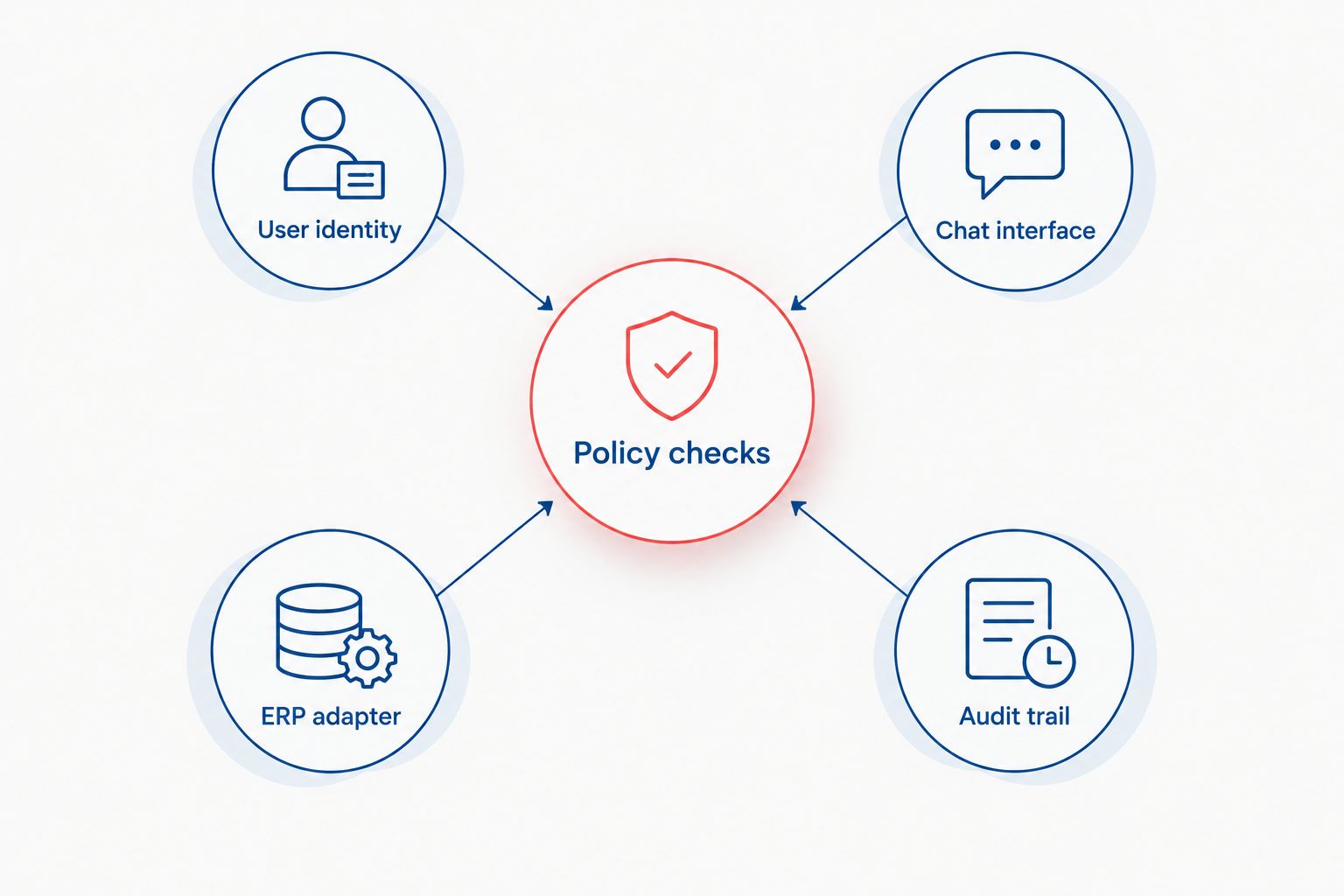
Keep secrets outside model prompts. Treat both user messages and retrieved text as untrusted input: neither should be able to change permissions or introduce an unauthorized operation.
In your 2026 architecture review, ask for the actual request path. A diagram that connects the model directly to the ERP without showing identity, validation, and failure handling leaves the central engineering questions unanswered.
Why chatbot ERP integration scope varies
The interface matters, but the workflow determines how much engineering surrounds it. Review these factors before agreeing to a delivery scope:
- Interface coverage. An available API is useful only if it exposes the required operation and fields.
- Identity boundaries. Customer, employee, company, and tenant permissions must map correctly to ERP access.
- Read versus write. Retrieval needs access controls; updates also need validation, confirmation, and transaction handling.
- Data meaning. Status codes, units, currencies, and warehouse identifiers need explicit interpretation.
- Freshness requirements. A reporting snapshot and a current operational lookup answer different questions.
- Failure recovery. Timeouts, partial completion, and duplicate requests need defined outcomes and owners.
Do not accept a scope described only as connecting the chatbot to the ERP. Name the supported questions, permitted actions, excluded records, and recovery responsibilities.
What should you test before approving the integration?
Build the acceptance checklist around business behavior. A model evaluation checks generated responses; an integration test must also check permissions, transactions, and system state.
| Test case | Required behavior | Evidence to retain |
|---|---|---|
| Authorized lookup | Return the correct permitted record | Request reference and source result |
| Another customer's identifier | Deny access without exposing record details | Authorization decision |
| Missing ERP field | State that the requested information is unavailable | Source response and chatbot answer |
| Instruction hidden in retrieved text | Treat the text as data, not permission | Validation outcome |
| ERP timeout | Report failure without claiming completion | Error and operation status |
| Repeated update request | Prevent or reconcile unintended duplication | Transaction reference and final state |
| Ambiguous modification | Request clarification before execution | Proposed action and confirmation |
Define the expected result before testing. Otherwise, a persuasive answer can hide a failed lookup or an unauthorized operation.
For a 2026 acceptance review, require evidence from realistic workflows, not just happy-path demonstrations. Measure answer correctness, authorization outcomes, transaction completion, and recovery behavior against criteria your team has approved. Do not substitute an unsupported accuracy claim for those checks.
Can a chatbot work with a legacy ERP without an API?
Yes, if an approved alternative interface supports the required workflow. Possible approaches include middleware, an authorized reporting connection, or tightly controlled UI automation.
The limitation is operational fragility. A screen change can break UI automation, while a reporting connection cannot safely substitute for a transaction interface. If no dependable interface exists, keep execution manual rather than disguising an unreliable connection behind a conversational screen.
Does an ERP chatbot need RAG?
No. Retrieval-augmented generation, or RAG, supplies reference material to a model; it does not replace ERP authorization or transaction execution.
Use document retrieval for explanations such as internal procedures. Use authorized ERP queries for operational facts such as an order's recorded state. When both appear in one answer, distinguish the policy explanation from the live record.
Should you rebuild the ERP to add a chatbot?
No—not merely to add a conversational interface. First determine whether the existing ERP can support a bounded integration through approved interfaces.
A replacement needs its own business case. If the real problem is inconsistent records or an undefined approval process, a chatbot does not correct it; the integration will inherit that uncertainty.
What should your development brief include?
Ask for a bounded workflow, not an open-ended assistant. Your brief should identify the user, the permitted records, the source of truth, the allowed actions, and what happens when execution fails.
Specify ownership as well. Name who controls credentials, maintains mappings, approves new operations, responds to incidents, and updates tests when the ERP changes. Your 2026 handover should include deployment instructions, access responsibilities, and a documented recovery process.
Finite Loop is best suited to founders and SMEs seeking custom chatbot development alongside existing-system integration. Its stated services include AI product development and custom software; a narrowly configured packaged connector is a different buying requirement. Choose custom development when your workflow warrants it, not simply because customization is available.
Discuss the workflow with Finite Loop using examples of permitted requests and explicit refusals. That gives the consultation a concrete engineering boundary.
FAQ
Can a chatbot integrate with an ERP system we already use?
Yes, when an authorized interface exposes the records or operations your workflow requires. Verify the installed ERP version, permissions, and interface coverage before committing to scope.
Can an ERP chatbot update orders automatically?
Yes, if the ERP supports the operation and application code enforces authorization and transaction rules. Consequential changes need defined confirmation, validation, and recovery behavior.
Is read-only ERP chatbot access safe?
Read-only access still requires authorization and data protection. It prevents permitted operations from changing records, but it does not prevent confidential information from being exposed.
Can we connect a chatbot directly to the ERP database?
Do not give a language model unrestricted ERP database access. Use approved interfaces or a tightly controlled reporting connection with enforced permissions.
Will an ERP chatbot always show real-time inventory?
No; freshness depends on the data source and retrieval path. Define whether the answer represents a current lookup or a replicated snapshot, including its warehouse context.
Does a chatbot replace our ERP approval workflows?
No; the chatbot should respect the ERP’s approval workflows rather than bypass them. A conversational confirmation is not a substitute for required business authorization.
What should we ask Finite Loop before starting an ERP chatbot project?
Ask Finite Loop to define the supported workflow, integration boundary, access model, and acceptance evidence. Also establish responsibility for credentials, deployment, maintenance, and failed transactions.
One last thing
Test an uncertain outcome before you celebrate a successful one. Disconnect the integration after submitting an approved test transaction, then check how the system determines whether the ERP committed it. The chatbot must not describe an unknown outcome as either confirmed success or confirmed failure.
That test exposes the difference between a conversational demonstration and an operational system. Keep the first release narrow enough that your team can explain every permitted action and recover every uncertain result.
Related guides
- Recover safely from failed integration syncs
- Scope an AI pilot with a software company
- Accept a software delivery before the final payment
Your project next
Let’s build what matters
Schedule a consultation to discuss your goals and technical needs.